A lightweight access point (LWAP) is centrally managed by a wireless LAN controller (WLC). This architecture simplifies larger wireless LANs by moving complex management functions from individual APs to the controller. section 19.2 section 19.2.2
Split-MAC architecture divides responsibilities between the LWAP and WLC:
- The LWAP performs real-time wireless operations, including transmitting and receiving RF signals, encrypting 802.11 frames, sending beacons, and responding to probe requests. section 19.2.2
- The WLC performs non-real-time management, including RF channel and transmit-power control, client authentication and association, QoS, and security-policy enforcement. section 19.2.2
- An LWAP normally connects to the wired LAN through an access port in the management VLAN, unlike an autonomous AP, which uses a trunk. section 19.2.2
- CAPWAP establishes control and data tunnels between the LWAP and WLC; the WLC maps SSIDs to VLANs and translates tunneled wireless frames into Ethernet frames. section 19.2.2 section 19.3
- The control tunnel uses UDP port 5246 and is encrypted by default with DTLS; the data tunnel uses UDP port 5247 and is not encrypted by default. section 19.3
Joining a WLC
After booting and obtaining an IP address, an LWAP discovers available WLCs through LAN broadcasts, previous associations, manual configuration, DHCP option 43, or DNS resolution of CISCO-CAPWAP-CONTROLLER.local-domain. After joining, it receives WLAN, band, channel, and transmit-power settings from the WLC without manual AP configuration. section 21.3.4
Figure 19.8 CAPWAP creates two tunnels between each LWAP and the WLC: a control tunnel and a data tunnel. The control tunnel uses UDP port 5246, and the data tunnel uses UDP port 5247.
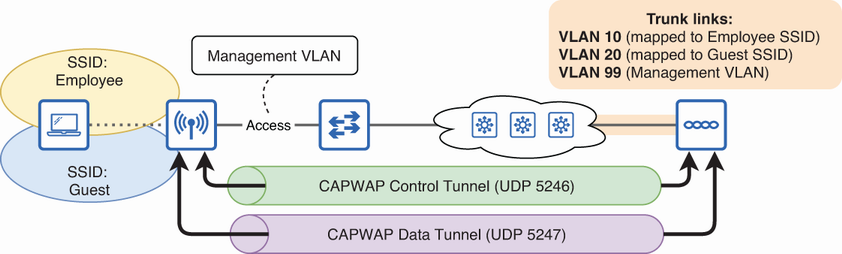
Use the tunnel diagram to distinguish CAPWAP control traffic from client-data traffic and associate each tunnel with its UDP port. section 19.2.2
Figure 19.9 WLC deployment options. A unified WLC is a dedicated hardware appliance. A cloud WLC is a VM deployed in a private or public cloud. An embedded WLC is integrated into a switch. A Mobility Express WLC is integrated into an AP.
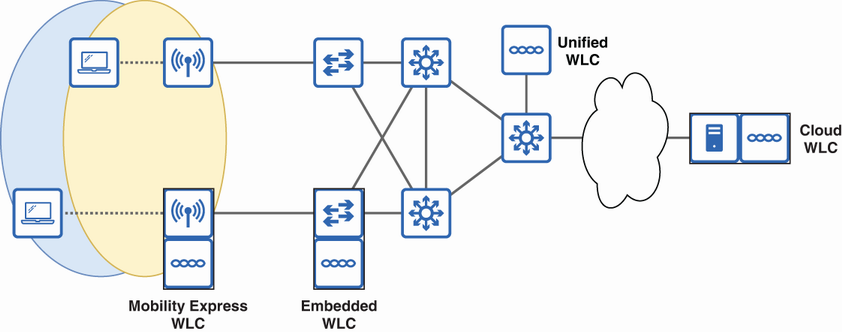
Compare unified, cloud, embedded, and Mobility Express WLC deployments when selecting where centralized LWAP control resides. section 19.2.2
Figure 19.10 With FlexConnect enabled, a LWAP can locally switch traffic between SSIDs and VLANs. FlexConnect can be enabled per SSID.
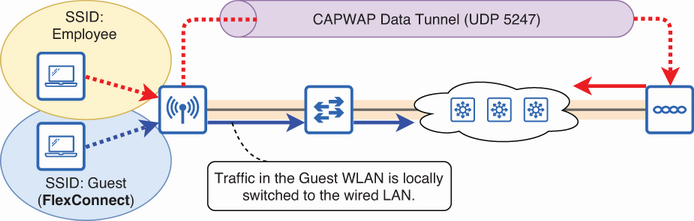
Examine FlexConnect as the operational exception that allows an LWAP to switch traffic locally between SSIDs and VLANs. section 19.2.2
