A trunk port carries traffic for multiple VLANs across one link, allowing switches to preserve VLAN separation without a separate physical link for every VLAN. The sending switch adds an IEEE 802.1Q tag identifying each frame’s VLAN; the receiving switch reads the tag and assigns the frame accordingly. Trunk ports are typically used between switches and sometimes between switches and routers. section 12.3 section 12.5
Access ports belong to one VLAN and carry untagged frames, whereas trunk ports can carry VLANs 10, 20, and 30 over the same connection. This scales better than using one access link per VLAN. Hosts in different VLANs still cannot communicate directly; inter-VLAN routing requires a router or multilayer switch. section 12.3 section 12.4
Configure and verify a trunk
On a switch that supports both 802.1Q and ISL, configure the encapsulation before trunk mode: SW1(config)# interface g0/0 SW1(config-if)# switchport trunk encapsulation dot1q SW1(config-if)# switchport mode trunk SW1(config-if)# switchport trunk allowed vlan 10,20,30 Verify the result with show interfaces trunk. The output should show G0/0 as on, using 802.1Q, with trunking status and VLANs 10, 20, and 30 allowed. If the switch supports only 802.1Q, omit the encapsulation command. Configure the connected switch port to match. section 12.3.2
By default, all VLANs are allowed on a trunk. Restricting the list with switchport trunk allowed vlan reduces unnecessary propagation. The command supports add, remove, all, none, and except options. A trunk port no longer appears in show vlan brief because it is not assigned as an access port. section 12.3.2
The native VLAN is carried untagged. VLAN 1 is the default native VLAN, but switchport trunk native vlan 30 changes it to VLAN 30. Both ends must use the same native VLAN: a mismatch can make an untagged frame enter the wrong VLAN and fail to reach its destination.
Trunking for router-on-a-stick
A switch-to-router trunk can support inter-VLAN routing through router subinterfaces. Configure the switch trunk with only the required VLANs and use an unused native VLAN; configure each router subinterface with its VLAN tag and IP address: SW1(config-if)# switchport trunk allowed vlan 10,20,30 SW1(config-if)# switchport trunk native vlan 999 R1(config-subif)# encapsulation dot1q 10 R1(config-subif)# ip address 172.16.1.1 255.255.255.192 The router receives tagged frames on one physical interface and selects the appropriate virtual subinterface. section 12.4.1
Figure 12.5 SW1 and SW2 are connected by a trunk link, which can carry traffic in multiple VLANs. SW1 and SW2 are two physical switches, each consisting of three virtual switches—one for each VLAN. (1) PC1 (connected to SW1) sends a frame addressed to PC10’s MAC. (2) SW1 forwards the frame out of its G0/0 port, which is in trunk mode. It adds a tag to the frame, indicating that the frame is in VLAN 10. (3) SW2 forwards the frame out of its G0/1 port (untagged).
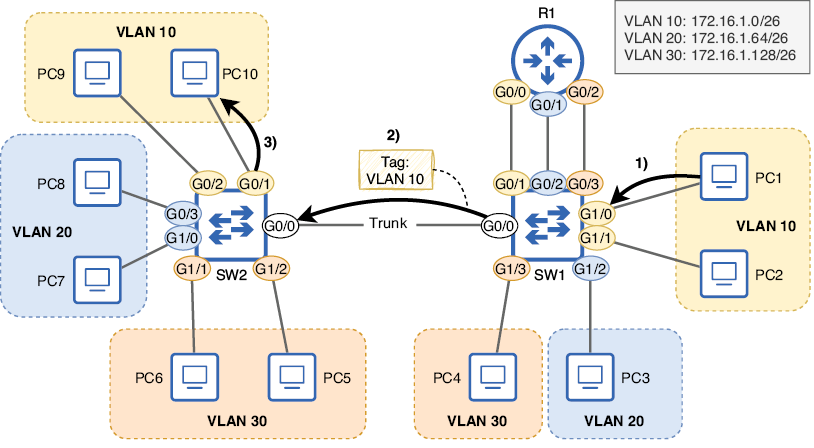
Trace a VLAN 10 frame from a host on SW1 across the tagged trunk to SW2, where it exits toward the destination host untagged. section 12.3
