IEEE 802.1Q, commonly called dot1Q, tags Ethernet frames so trunk ports can carry traffic from multiple VLANs. The 4-byte tag sits between the Source and EtherType fields. Its TPID identifies tagged frames with 0x8100, while TCI contains PCP, DEI, and the 12-bit VLAN Identifier (VID), supporting up to 4,096 VLANs. section 12.3.1 section 12.5
Figure 12.6 The 802.1Q tag’s position in an Ethernet frame and the field of the tag. The fields are TPID (Tag Protocol Identifier) and TCI (Tag Control Information). TCI contains three subfields: PCP (Priority Code Point), DEI (Drop Eligible Indicator), and VID (VLAN Identifier).
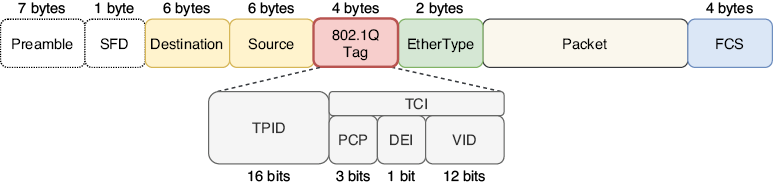
Use the frame diagram to locate the 802.1Q tag and distinguish TPID from the TCI subfields PCP, DEI, and VID. section 12.3.1
Apply 802.1Q when configuring and troubleshooting trunk links:
- Configure a trunk with switchport mode trunk. On switches supporting both 802.1Q and ISL, select dot1Q first with switchport trunk encapsulation dot1q; switches supporting only 802.1Q do not require that command. section 12.3.2
- Restrict forwarding with switchport trunk allowed vlan, using VLAN lists or the add, all, except, none, and remove keywords. Trunks allow all VLANs by default. section 12.3.2 section 12.5
- Treat the native VLAN as the untagged VLAN. Non-native VLAN frames are tagged, while native VLAN frames cross the trunk without a tag; both sides must use matching native VLANs. section 12.3.2 section 12.5
Configure and verify a dot1Q trunk
On SW1, configure G0/0 for 802.1Q and trunk mode, allow VLANs 10, 20, and 30, then verify the result: SW1(config-if)# switchport trunk encapsulation dot1q SW1(config-if)# switchport mode trunk SW1(config-if)# switchport trunk allowed vlan 10,20,30 SW1(config-if)# do show interfaces trunk The verification should show G0/0 as trunking with 802.1q encapsulation and VLANs 10,20,30 allowed. A native VLAN mismatch can misclassify untagged frames and prevent delivery to the intended VLAN.
