A VLAN tag is a four-byte IEEE 802.1Q field inserted between the Source and EtherType fields of an Ethernet header. It identifies the VLAN carried by a frame, allowing trunk links to transport multiple VLANs between switches or between a switch and router. section 12.3 section 12.3.1
The 802.1Q tag contains these fields:
- TPID is 16 bits and always contains 0x8100, identifying an 802.1Q-tagged frame. section 12.3.1
- TCI contains PCP, DEI, and VID. section 12.3.1
- PCP uses 3 bits for QoS priority marking, while DEI uses 1 bit to identify frames that may be dropped during congestion. section 12.3.1
- VID uses 12 bits to identify the VLAN, supporting 4,096 possible VLAN values. section 12.3.1
Tagged and untagged forwarding
Suppose SW1 and SW2 each connect hosts in VLANs 10, 20, and 30. SW1 adds a tag identifying VLAN 10 before sending a frame across their trunk link. SW2 reads the tag and forwards the frame within VLAN 10, removing the tag when sending through an access port. Access ports serve one VLAN and therefore normally send and receive untagged frames. section 12.3
Figure 12.6 The 802.1Q tag’s position in an Ethernet frame and the field of the tag. The fields are TPID (Tag Protocol Identifier) and TCI (Tag Control Information). TCI contains three subfields: PCP (Priority Code Point), DEI (Drop Eligible Indicator), and VID (VLAN Identifier).
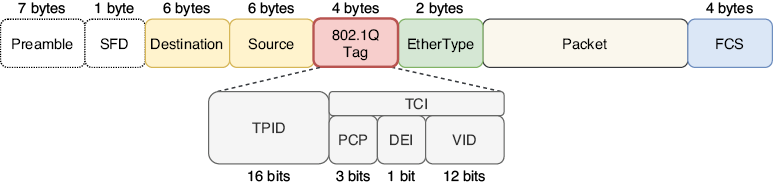
Use the frame diagram to locate the 802.1Q tag and distinguish TPID, TCI, PCP, DEI, and VID. section 12.3.1
Router-on-a-stick designs also use tagged frames: a router's subinterface is associated with a VLAN through encapsulation dot1q vlan-id. The VLAN tag lets the router select the corresponding subinterface. section 12.4.1
