Euler sampler is a diffusion sampling method built on Euler’s classical method for solving ordinary differential equations. In practice, it is one selectable route from noise to an image, rather than a permanent part of the diffusion model. That separation is why interfaces such as A1111 let you swap samplers from a dropdown. section 6.2.1
Use Euler as a practical starting point, then compare it when the image deserves a second opinion:
- Choose Euler alongside a schedule type, sampling-step count, CFG scale, seed, and image dimensions. section 7.1.3
- Compare results at the same settings before blaming the sampler for every strange eye, tattoo, or spaceship. section 6.1.2
- Increase sampling steps when differences become distracting; at adequate step counts, competing samplers can produce nearly identical images. section 6.2.2
- Treat Euler as a useful default in Flux workflows, while checking whether other sampler choices are supported. section 10.3
A sampler bake-off
Generate the same sand-castle prompt with DDIM, Euler, and DPM++ 2M at 10 steps, Karras scheduling, seed 1337, and CFG 7. The outputs differ visibly, but increasing the count to 30 steps makes them nearly identical. Euler may be your favorite—not because it wins a universal beauty contest, but because the result suits your image. section 6.2.2
Figure 6.7 Exploring 10 steps with 3 different sampling methods.
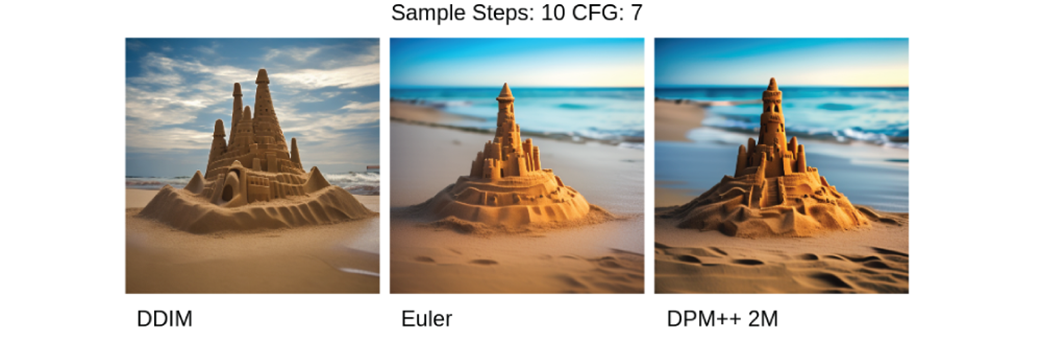
Compare the three samplers visually at 10 steps before increasing the step count. section 6.2.2
