A flowchart turns an application process into a visual sequence of pages, actions, choices, and destinations. It exposes the user journey before implementation, helping developers challenge assumptions about whether a workflow is actually easy to use. section 7.3
Use a flowchart to:
- Map entry points, user actions, decision branches, repeated steps, exits, and final destinations. section 7.3
- Review the journey before writing interface code, rather than assuming a developer-designed flow will suit other users. section 7.3
- Generate a first draft quickly from a plain-language description, then revise it with deliberate design judgment. section 7.3 section 7.4
A practice-test workflow
Describe the process as: entry page → start test → question 1 → submit an answer through question 35, or end the test at any time → results page → return home. Ask ChatGPT to create a Mermaid diagram. The generated chart can show labeled transitions such as “Submit Answer” and “End Test,” while the developer checks whether every route matches the intended application behavior. section 7.3 section 7.4
Figure 7.4 Our application’s workflow
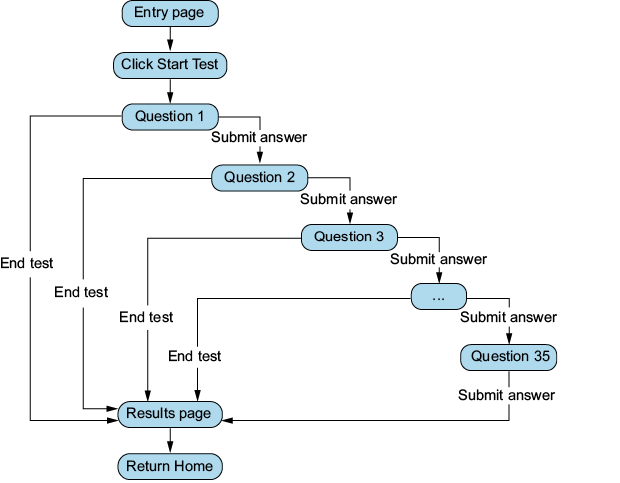
Inspect the application workflow as a visual artifact before connecting the interface to functional templates and components. section 7.3

