A flowchart is a visual recipe for completing a task. It shows instructions as connected steps, decisions as branches, and repeated work as a path that loops back. section 2.2
Read the main flowchart symbols this way:
- Rectangular boxes show actions, such as adding ingredients or putting dough in a pan. section 2.2
- Diamond boxes show decisions, such as choosing butter or canola oil instead of using both. section 2.2
- Arrows show the order of steps; an arrow returning to an earlier step shows repetition. section 2.2
- Following the arrows traces one possible path through the task. section 2.2
Deciding whether to eat breakfast
A morning decision flowchart can begin when the alarm rings, ask whether there is enough time before an 8:30 A.M. meeting, and lead to the answer that breakfast is possible when the commute takes 45 minutes and the alarm rings at 7:30 A.M. section 13.0
Figure 2.2. A flowchart of a simple recipe for baking bread. Rectangular boxes represent taking an action. Diamonds represent a decision point. The line going back up to a previous step represents a sequence repetition. Follow the arrows to trace paths through various implementations of the recipe.
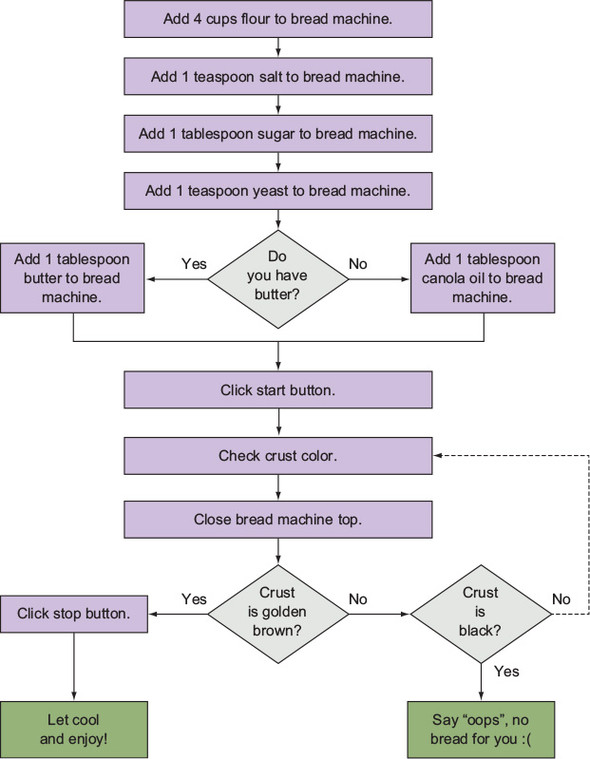
Use the bread-baking flowchart to trace action steps, decision branches, and a repeated sequence visually. section 2.2

