Font weight is the thickness of a typeface’s strokes. Most families offer at least normal and bold; larger families may offer many more choices. On the web, the font-weight property selects that treatment. Weight is more than decoration: it creates contrast, helps readers notice important content, and makes headings easier to distinguish from body text. section 8.1.3
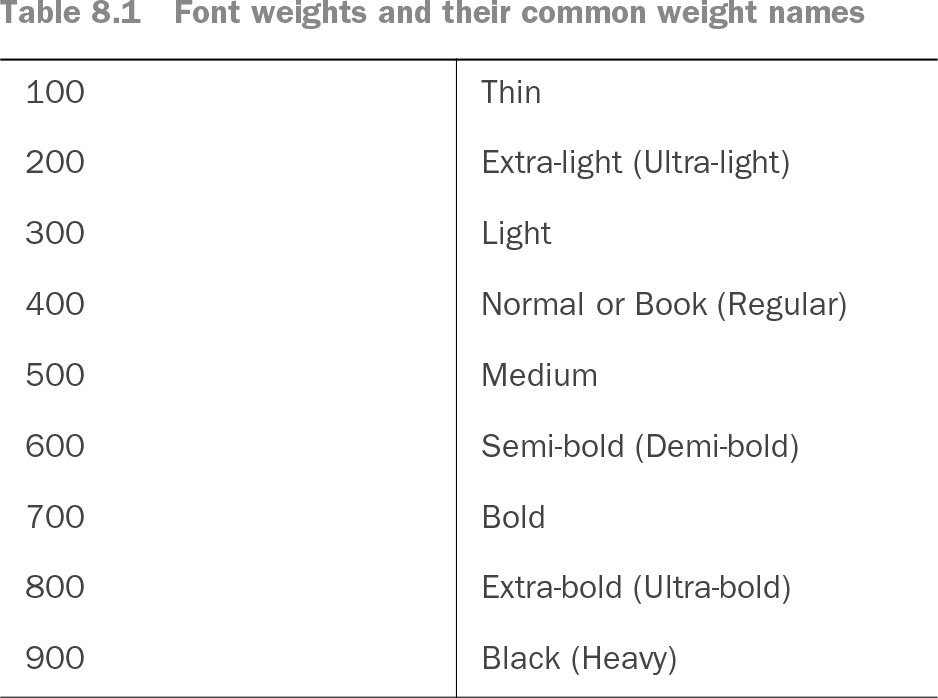
Table 8.1 Font weights and their common weight names (view table figure)
Numeric weights commonly run from 100 Thin through 900 Black, with 400 as Regular and 700 as Bold. Names vary by family, but the scale helps compare available weights. section 8.1.3
Use weight intentionally rather than treating every available option as a design palette. Too many weights can make an interface feel inconsistent, complicate a style guide, and require more font files to load. A small set of clearly different treatments is easier to maintain and gives text roles a predictable visual meaning. section 8.1.3
Choose weights by the job each piece of text needs to do:
- Keep body copy at a readable regular or medium weight; thin faces can fail at small sizes, while very bold body text can feel too intense. section 10.4
- Make headings visibly heavier than nearby body copy when weight is carrying hierarchy. section 8.2.2
- Pick weights with enough difference to signal separate roles; small size and weight differences can leave headings and paragraphs looking too similar. section 8.2.2
- Limit loaded font files, especially when a family offers numerous static weights. section 8.1.3
One-family hierarchy
A single family can provide a simple hierarchy: set body copy in Regular 400 and a heading in Extra-bold 800. The large difference creates contrast without requiring a second typeface. By comparison, a heading only slightly larger and set at the same weight as the body copy produces a weaker hierarchy. section 8.2.2
Variable fonts make weight selection more precise. Rather than loading separate Regular 400 and Bold 700 files, a variable font can provide the weights between them in one file. For example, a weight such as 430 can fine-tune text that feels too light at 400 but too heavy at 500, while avoiding multiple individual font files. section 8.2.1
Weight also supports typeface pairing. When headings and body copy come from one family or superfamily, changing the heading to a bolder option can establish hierarchy. Weight should still fit the page’s intended tone and work alongside size, letter shapes, and typeface category rather than replacing those decisions. section 8.2.2