A Django Form is a Python object that describes inputs, accepts submitted values, validates them, records errors, and can render the matching HTML. It reduces repetitive form code without taking over the view: the view still decides what happens after valid data arrives. section 7.1 section 7.6
Define a form by subclassing forms.Form and declaring fields. Each field has a widget that renders an HTML control: CharField normally becomes a text input, while an overridden Textarea widget produces a textarea. Widget attributes can set details such as rows, columns, or CSS classes. section 7.1 section 7.6
A comment form
A CommentForm can declare name as a CharField and comment as a CharField using Textarea. Rendering form.as_p produces labels and controls wrapped in paragraphs, including required attributes. This is quick and useful until a design needs markup beyond what automatic rendering supplies. section 7.1 section 7.1.3
A typical view handles both stages of the request. On GET, create an empty form and render it. On POST, construct the form with request.POST and call is_valid(). Invalid input leaves errors on the form and redisplays the page; valid input is available through cleaned_data, after which the view performs its work and redirects. section 7.1.1 section 7.6
Keep these form-handling details straight:
- Use request.method to distinguish displaying the form from processing a submission; the usual single-view pattern posts back to the same URL. section 7.1.1
- Call is_valid() before using cleaned_data. Its result reflects the declared fields and their configuration. section 7.1.1
- Put {% csrf_token %} inside a POST form to add protection against cross-site request forgery. section 7.1.1 section 7.6
- For custom layouts, render individual fields and use their value, help text, and errors; preserve Django's expected name and id conventions in handwritten controls. section 7.1.3
Figure 7.2 Logic flow for a view that handles form submission
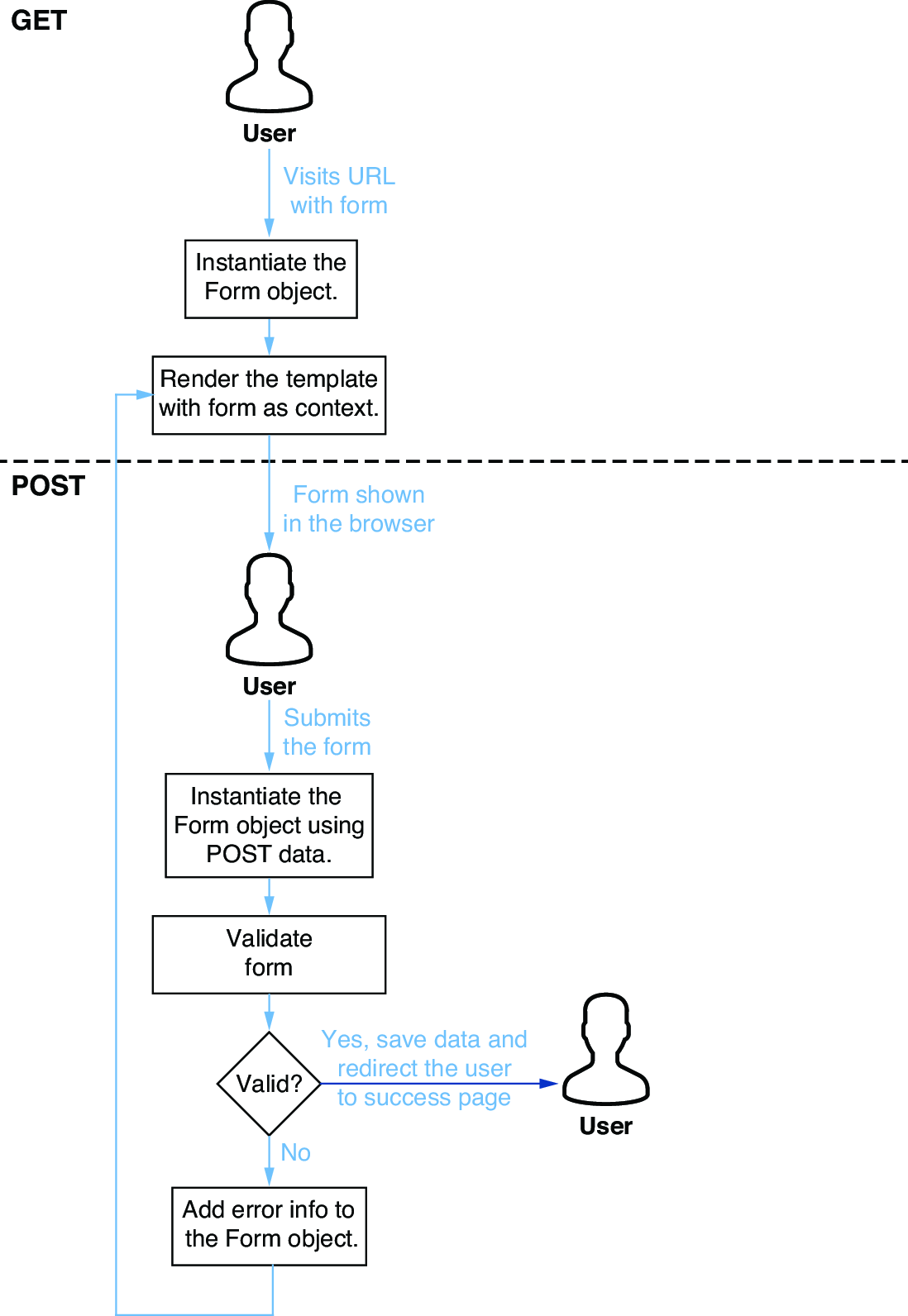
The request-flow diagram shows the core loop: GET displays an empty form, POST validates submitted data, invalid data returns with errors, and valid data redirects. section 7.1.1
Automatic rendering is a convenience, not a cage. CSS classes can be added through widget attributes, but frameworks such as Bootstrap may require wrapper markup that a Form cannot generate. In that case, retain the Form for values, help text, and errors while writing the HTML yourself. section 7.1.3
