A ModelForm turns a Django model definition into a web form, so fields a user fills out can map directly to fields stored in the database. It extends Form, but saves you from declaring the same set of fields twice—once for storage and again for input. Choose a ModelForm when the form mostly represents one model object, such as a classified ad, venue, or room. section 7.2 section 7.2.3
Figure 7.4 A ModelForm generates a Form equivalent for you based on a model class
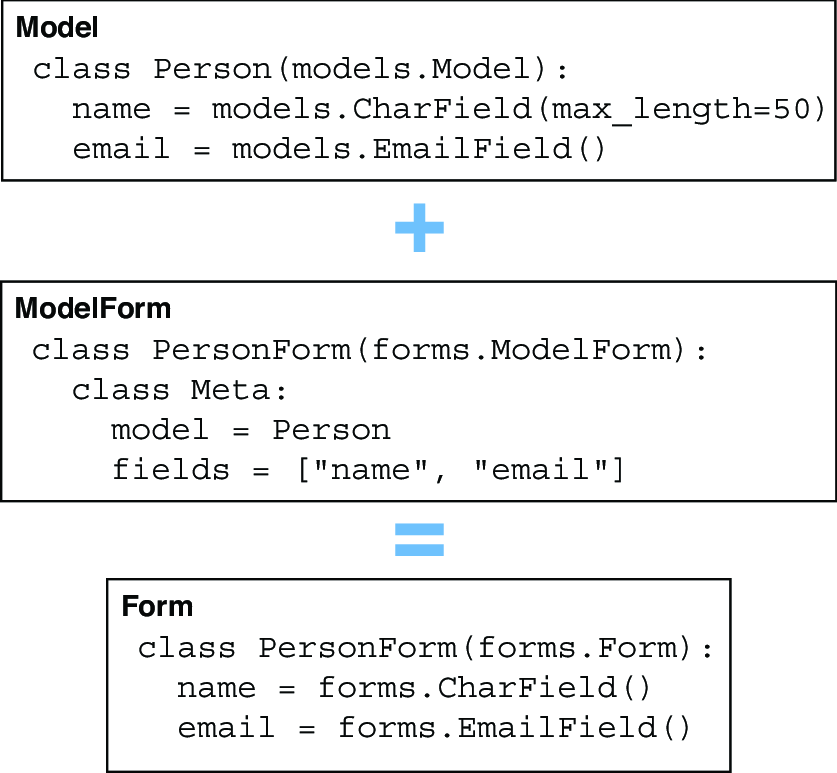
Use this diagram as the mental model: a model supplies the structure, and ModelForm produces the equivalent form fields for it. section 7.2.3
Define a ModelForm by inheriting from forms.ModelForm and adding an inner Meta class. Meta.model identifies the ORM model, while Meta.fields lists the model fields allowed to participate in the form. Keeping that list explicit makes the form’s purpose easy to see. section 7.2.3
A form for classified ads
SeekingAdForm connects to SeekingAd and includes seeking, musician, band, and content. Django constructs the corresponding fields. When the generated labels or widgets need friendlier wording, override __init__(), call super(), then change entries in self.fields—for example, a field label or help text. section 7.2.3
A typical ModelForm request flow is short and pleasantly repetitive:
- On GET, create an empty form for a new object, or pass instance=object to prepopulate an edit form. section 7.2.4 section 7.4.3
- On POST, bind submitted values with FormClass(request.POST); include request.FILES when the form accepts uploaded files. section 7.2.4 section 7.4.3
- Call is_valid() before saving; if invalid, render the form again so it can be corrected. section 7.2.4
- Call save() to store the matching model object, then redirect after a successful submission. section 7.2.4
Sometimes the model needs information that should not come from the submitted form. Calling form.save(commit=False) returns an unsaved instance, letting the view set required values such as owner before calling ad.save(). Without that step, saving an object whose required owner field is absent from the form raises an exception. section 7.2.4 section 7.6
For quick forms with little or no customization, forms.modelform_factory(Model, fields=[...]) creates a ModelForm without writing a named class. This fits a Venue form with name, description, and picture, or a one-field Room editor. A model with a file field produces an upload control, but the HTML form needs enctype="multipart/form-data" and the view must receive request.FILES. section 7.4.3 section 7.6
Editing an existing room with HTMX
Bind RoomForm to instance=room on both GET and POST. GET renders a partial containing the prefilled form; a valid POST saves the changed room and returns the display partial. HTMX targets the room row, replacing only that piece of the page instead of navigating away. section 12.5
