A web form is a collection of HTML controls that asks visitors for information and sends their answers somewhere when they submit it. Forms turn a read-only page into an interactive one for feedback, surveys, quizzes, newsletters, registrations, and event sign-ups. section 8.0 section 8.3
A control is one field or choice in a form. Choose the control to match the answer you need, then give it a clear label so visitors know what to enter or select. section 8.3 section 8.7
Common controls include:
- Text boxes for short typed answers, including special types such as email addresses, numbers, and URLs. section 8.7
- Text areas for longer, multiline answers. section 8.7
- Check boxes for yes/no, on/off, or accept/reject choices; a box can also start checked. section 8.3.5
- Radio button groups when visitors choose one of three or four options, and selection lists for five or more options. section 8.7
- A submit button, which tells the browser to process and send the completed form. section 8.3.8
To receive submitted data, set the form element’s action attribute to an endpoint and use the POST method. An endpoint is the address that receives and processes the data. Getform can provide an endpoint, though its free tier allows one endpoint and up to 50 submissions per month. section 8.3.1 section 8.2
Each control except the button needs a name attribute. The browser uses that name to identify the submitted field; selected radio buttons and list options submit their value attributes. A hidden field can help Getform discard bot submissions when bots fill it in. section 8.5.1
Event sign-up form
An event page can combine a header, event details, and a form with a name text box, email field, text area, notification check box, radio-button day choice, selection list, and submit button. Ask ChatGPT for separate HTML and CSS, save the HTML as index.html, and save the linked stylesheet in the same folder. section 8.4 section 8.1
Figure 8.1 An event sign-up page generated by ChatGPT
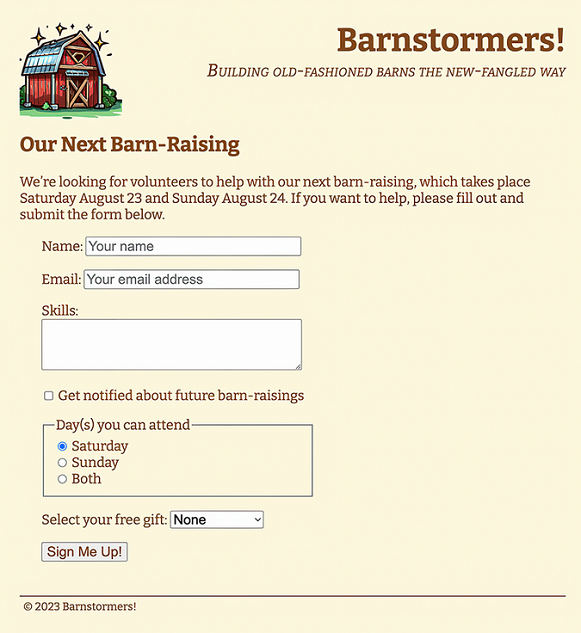
Use the event sign-up page image to see how a form can sit alongside a page header, event information, and footer. section 8.1











