A form field is a control for entering or choosing information. It must be easy to find, understand, and use. A faint border can make a field disappear in bright sunlight; a missing label can leave a screen reader or voice-control user unsure what to enter. section 3.1.3 section 6.1.1
Give every field an accessible name and, in ordinary forms, a permanently visible label close to it. Connect a native <label> to the field with matching for and id values. A screen reader can then announce the label on focus, and a voice-control user can select the field by saying its visible name. A placeholder may show an example value, but it disappears during entry and cannot replace the label. section 6.1.1 section 6.7
Associate the label with the input
<label for="name">Owner’s name</label> <input name="name" id="name" type="text"> The matching values make “Owner’s name” the input’s associated label. section 6.1.1
Make the field’s clickable area visible with a border, underline, or background that has sufficient contrast against its surroundings. Do not rely on faint placeholder text to show where the field is: it vanishes when typing begins. section 3.1.3
Figure 3.4 When input fields do not have sufficient contrast with their background, users may fail to notice them entirely, particularly in bright environments like direct sunlight or for people with vision impairments.
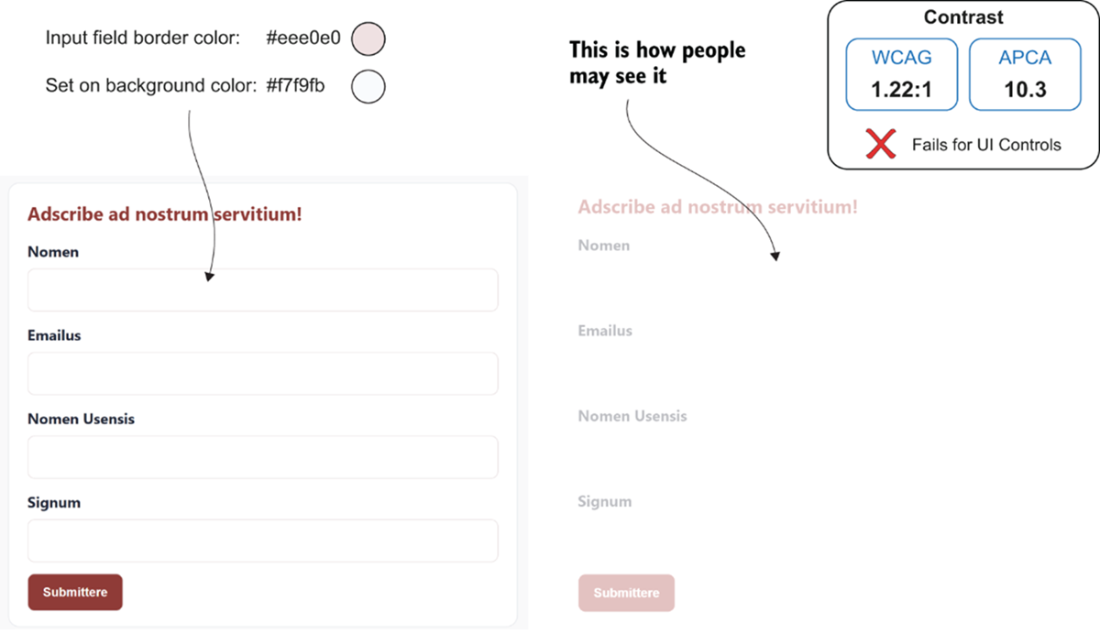
Compare the field boundaries to see how insufficient contrast can make an input hard to notice, especially in bright light or for someone with low vision. section 3.1.3
When choosing and arranging fields:
- Prefer native HTML controls. Set an appropriate input type, such as email or date, so the browser can offer suitable entry controls; inputmode can request a more useful virtual keyboard. section 6.1.3
- Explain required information and formats before users make mistakes. Group related fields with <fieldset> and <legend> when that relationship helps clarify the task. section 6.7
- Keep fields reachable in a logical keyboard order, with a visible focus indicator. Pointer-only interaction is not enough. section 5.3
TIP: Start with native controls rather than recreating their semantics and keyboard behavior. NOTE: Adding aria-label or aria-labelledby to an already labeled input can override its native label and produce an incomplete accessible name. section 6.1.3 section 6.1.1