A form field is an interactive part of a web form where a visitor enters, chooses, or submits information. Forms turn an otherwise read-only page into one that can collect feedback, survey answers, newsletter sign-ups, registrations, and other responses. section 8.0 section 8.7
A field is also called a form control. Choose the control to match the information you need: a short written answer, a longer message, a yes/no choice, one choice from several options, or a submitted form. The completed form sends its data to an endpoint. section 8.3 section 8.3.1 section 8.7
Common field types include:
- Text boxes for typed text. Use text, number, email, or URL inputs for the expected kind of value. section 8.3.2
- Text areas for longer, multiline responses. section 8.7
- Check boxes for yes/no or on/off information. section 8.7
- Radio button groups for one choice among three or four options, and selection lists for five or more options. section 8.7 section 8.3.7
- Buttons for submitting the completed form. section 8.7
Give every field except a button a short, descriptive label so visitors know what to provide. For text boxes, you can also request a width, starting value, placeholder, minimum or maximum length, and required status. A two-column grid can place labels beside their controls. section 8.3.2 section 8.3.3
Event sign-up form
An event sign-up page can combine fields for a name and email address with choices such as skills, an available day, a gift preference, and notification options. Each control has a name so the browser can identify its submitted value; selected radio buttons and list items also submit their values. section 8.5.1 section 8.4
Figure 8.1 An event sign-up page generated by ChatGPT
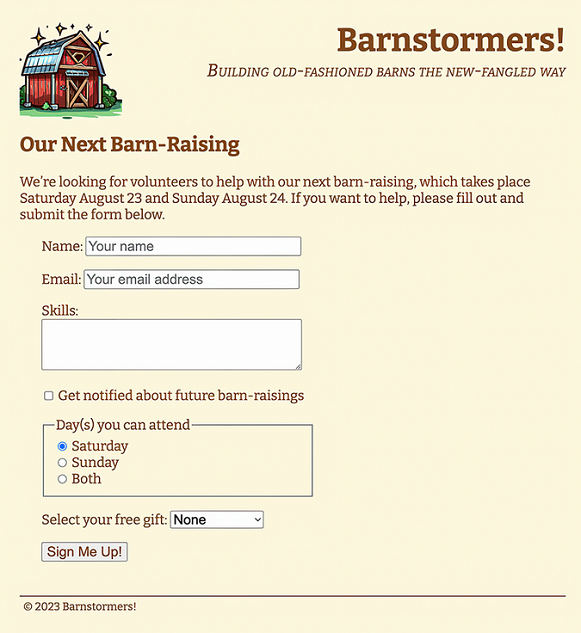
Use the event sign-up page as a visual model for placing a form alongside event information within a complete page. section 8.1

