The forwarding state is a stable Spanning Tree Protocol (STP) port state. A port in this state is active, learns MAC addresses, and forwards and receives ordinary frames. Root ports and designated ports normally enter forwarding after STP confirms that using them will not create a Layer 2 loop. section 14.4 section 14.4.1
Compare the four principal STP port states:
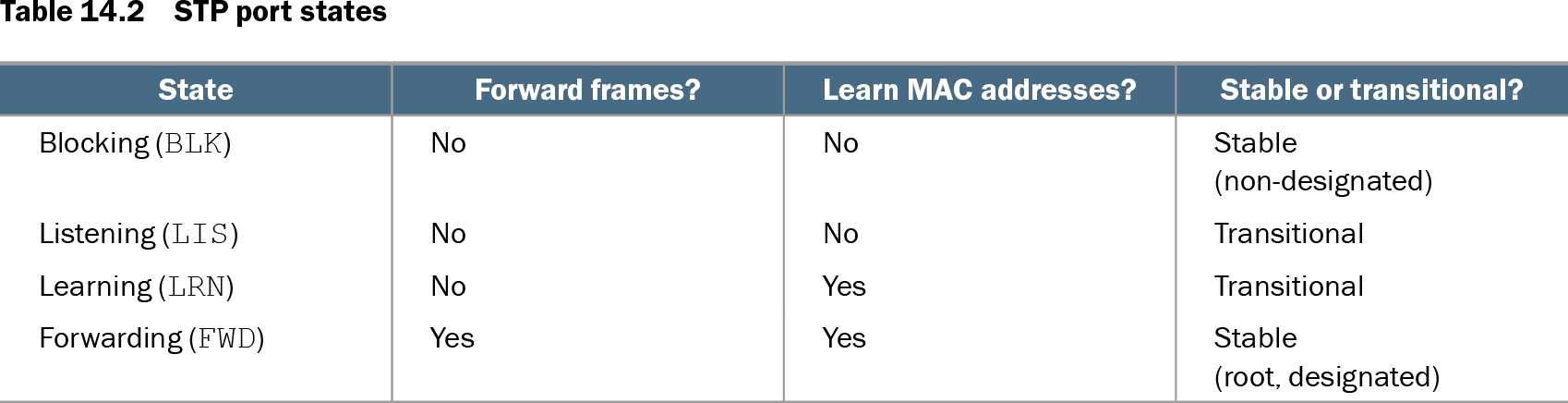
- Blocking: stable, does not forward frames or learn MAC addresses, and normally identifies a non-designated port. section 14.4
- Listening: transitional, processes STP decisions but neither forwards frames nor learns MAC addresses. section 14.4.1
- Learning: transitional, continues listening for BPDUs and learns MAC addresses but still does not forward ordinary frames. section 14.4.1
- Forwarding: stable, both learns MAC addresses and forwards frames; root and designated ports use this state in a converged LAN. section 14.3.3
A newly enabled port does not enter forwarding immediately. It passes through listening and learning first, spending 15 seconds in each state by default. Therefore, a newly enabled port normally takes 30 seconds to forward frames. After a topology change, the max age timer can add 20 seconds, allowing STP to take up to 50 seconds before a blocking path becomes forwarding. section 14.4.2 section 14.4.1
Observing a port transition
On SW2, `shutdown` followed by `no shutdown` re-enables G0/1. The command `do show spanning-tree` can then display `Root LIS`, showing that the root port is currently listening rather than forwarding. If it remains a root or designated port, it proceeds through learning and then forwarding.
PortFast can move an access port immediately to forwarding, bypassing listening and learning so an end host gains access without the normal 30-second wait. Configure it with `spanning-tree portfast` in interface configuration mode, but use it only for end-host ports; connecting switches can create Layer 2 loops. section 14.5.1
Table 14.2 STP port states (view table figure)
| State |
Forward frames? |
Learn MAC addresses? |
Stable or transitional? |
|---|---|---|---|
| Blocking (BLK) |
No |
No |
Stable (non-designated) |
| Listening (LIS) |
No |
No |
Transitional |
| Learning (LRN) |
No |
Yes |
Transitional |
| Forwarding (FWD) |
Yes |
Yes |
Stable (root, designated) |
Use the state table to compare forwarding, MAC learning, stability, and the roles associated with each STP state. section 14.4.1