Spanning Tree Protocol (STP) prevents Layer 2 loops by blocking redundant connections and leaving one active path between destinations. It preserves redundancy while preventing broadcast storms, repeated frame flooding, and MAC address flapping. section 14.1 section 14.2
Figure 14.1 PC1 sends a broadcast frame, and SW1 floods it. When SW2 and SW3 receive their copies of the frame, they flood it too, resulting in two loops: counterclockwise (A) and clockwise (B). These frames will loop indefinitely between SW1, SW2, and SW3.
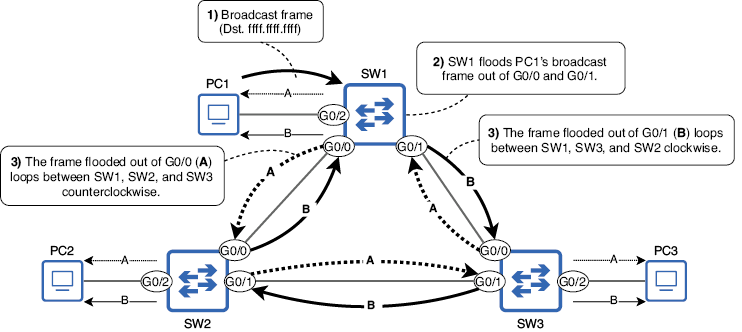
Compare the physical ring, where flooded frames loop indefinitely, with the logical topology created by STP. section 14.1
STP builds a spanning tree by electing a root bridge, selecting one root port on each non-root switch, and selecting one designated port per Layer 2 segment. Remaining non-designated ports block regular traffic but remain available if an active link fails. section 14.3 section 14.3.3
Use these decision rules in order:
- Elect the switch with the lowest bridge ID (BID) as root bridge. The BID combines bridge priority and MAC address; Cisco adds the VLAN ID through the Extended System ID. section 14.3.1 section 14.6
- Select one root port per non-root switch using the lowest root cost, then the lowest neighbor BID, then the lowest neighbor port ID. section 14.3.2
- Select one designated port per segment using the switch with the lowest root cost, then the lowest BID; block the other port. section 14.3.3
Figure 14.4 A LAN after STP has created a loop-free topology. SW3 is the root bridge, and each other switch has one root port leading to SW3. The remaining ports are either designated or non-designated ports; non-designated ports are blocked, disabling their connections.
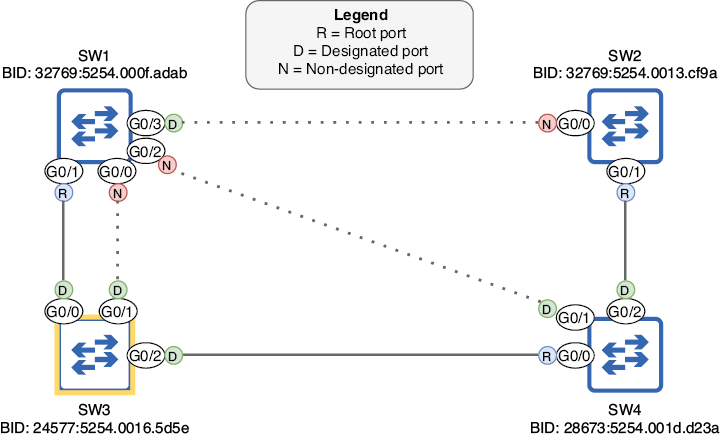
Trace a completed STP topology showing the root bridge, each root port, designated ports, and blocked connections. section 14.3
Switches exchange Bridge Protocol Data Units (BPDUs) to make these decisions. Standard STP uses blocking, listening, learning, and forwarding states. A newly enabled forwarding port waits through listening and learning; default timers can make recovery take up to 50 seconds. section 14.3.1 section 14.4.1 section 14.4.2
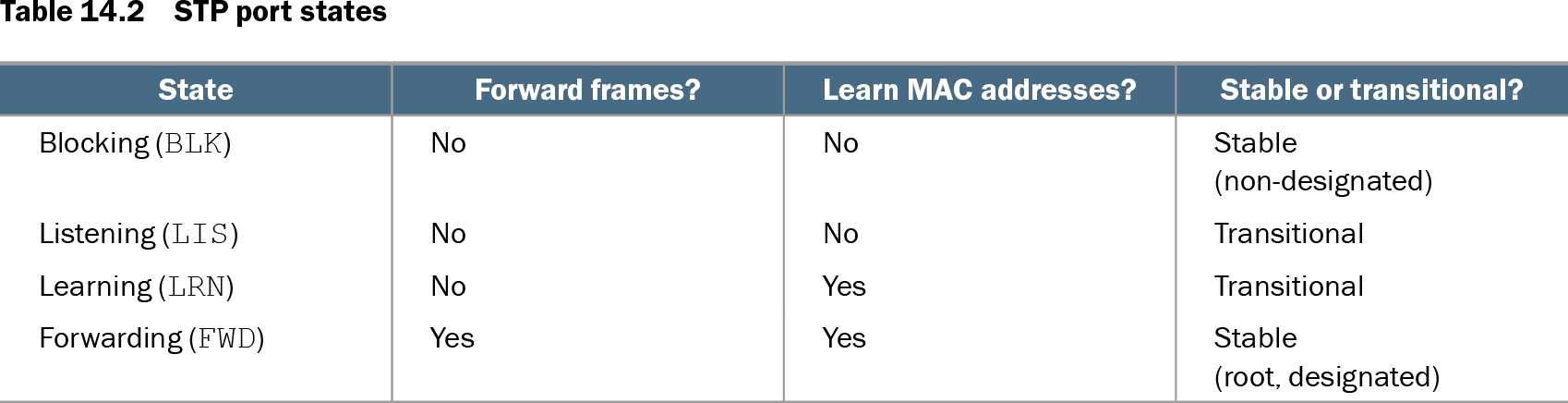
Table 14.2 STP port states (view table figure)
| State |
Forward frames? |
Learn MAC addresses? |
Stable or transitional? |
|---|---|---|---|
| Blocking (BLK) |
No |
No |
Stable (non-designated) |
| Listening (LIS) |
No |
No |
Transitional |
| Learning (LRN) |
No |
Yes |
Transitional |
| Forwarding (FWD) |
Yes |
Yes |
Stable (root, designated) |
Use the state table to distinguish whether a port forwards frames, learns MAC addresses, and remains stable or transitional. section 14.4.1
Selecting and verifying a root bridge
Configure a lower VLAN 1 priority on SW3, then inspect the result: `SW3(config)# spanning-tree vlan 1 priority 24576`. Verify with `show spanning-tree`; a root priority of 24577 reflects the configured priority plus VLAN 1, and the output identifies the root bridge and port roles. Cisco priority values must use increments of 4096.
PortFast improves end-host access by moving an access port directly to forwarding, bypassing listening and learning. Enable it only on ports connected to end hosts; connecting a switch can create a Layer 2 loop. section 14.5.1
Table 14.3 STP timers (view table figure)
| Timer |
Purpose |
Duration |
|---|---|---|
| Hello |
How often BPDUs are sent |
2 seconds |
| Forward delay |
The length of the listening and learning states |
15 seconds (per state) |
| Max age |
How long a switch will wait to change the STP topology after ceasing to receive BPDUs on a port |
20 seconds |
Review the default hello, forward-delay, and max-age timers that govern BPDU transmission and topology changes. section 14.4.2