Frontend development is more than assembling screens. A frontend stack must support UI creation, state and data flow, API access, builds, and testing. Document the choices so developers, designers, QA, and project managers can plan and collaborate around the same system. Revisit them as project needs and the ecosystem change. section 1.5.1
A useful React stack description separates concerns without pretending each concern needs exactly one tool:
- Foundation: build tools, bundling, and TypeScript. section 1.5.2
- Data and API: state flow, data management, and fetching. section 1.5.2
- UI and testing: component and styling libraries, plus unit, integration, and end-to-end tests. section 1.5.2
Keep presentation and data management behind a clear boundary when the application needs alternative state implementations. In one React architecture, a provider wraps the presentation components, while four custom hooks expose the data those components need. The presentation layer can then stay largely fixed as the data layer changes; an XState variant is a noted exception. section 8.0 section 8.2
Figure 8.4 The interactions between the presentation layer and the data layer happen in five components, using four custom hooks. The component that displays all things uses the useAllThings hook. The component that allows the user to add a thing uses the useAddThing hook. Both the component that displays a single thing and the component that displays a thing in a list use the useThing hook. Finally, the overall component that displays either a list or a single thing uses the useCurrentThing hook.
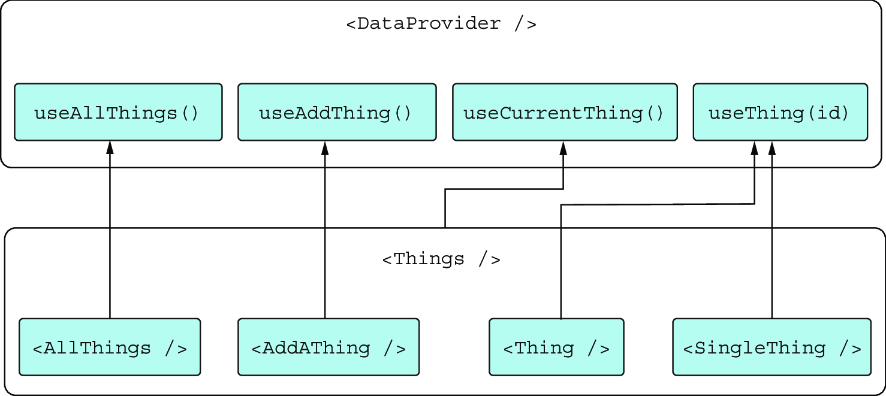
The component-to-hook diagram makes the presentation–data boundary concrete: list, detail, add, and view-selection components depend on four focused hook APIs. section 8.2
Expense tracker: test what the UI layer supplies
A frontend-only Remix expense tracker can show the right pages and components yet remain static and noninteractive because its data layer, loaders, and actions are missing. Conversely, a backend-only version can read and write data but display raw JSON and rudimentary forms. Build the UI on that functional base, or start from a skeleton by establishing the page framework and routes before adding data and visual layers. section 12.1.1 section 12.2


