liveBook · Manning

Full backup

As explained in Fundamentals of Cybersecurity

A full backup is a copy containing all selected data or system state at the time the backup is created.

A full backup copies all selected data, creating a complete copy at the time the backup is made. section 7.2

Full backups provide comprehensive protection, but take more time and storage space than differential or incremental backups. Backup frequency also matters: shorter intervals reduce the risk of losing recent changes. section 7.2

Weekly server backup

An organization completes a full backup every Sunday night, making an exact copy of all data on its servers. section 7.2

Figure 7.1 Summary of data recovery strategies with main use case and characteristics
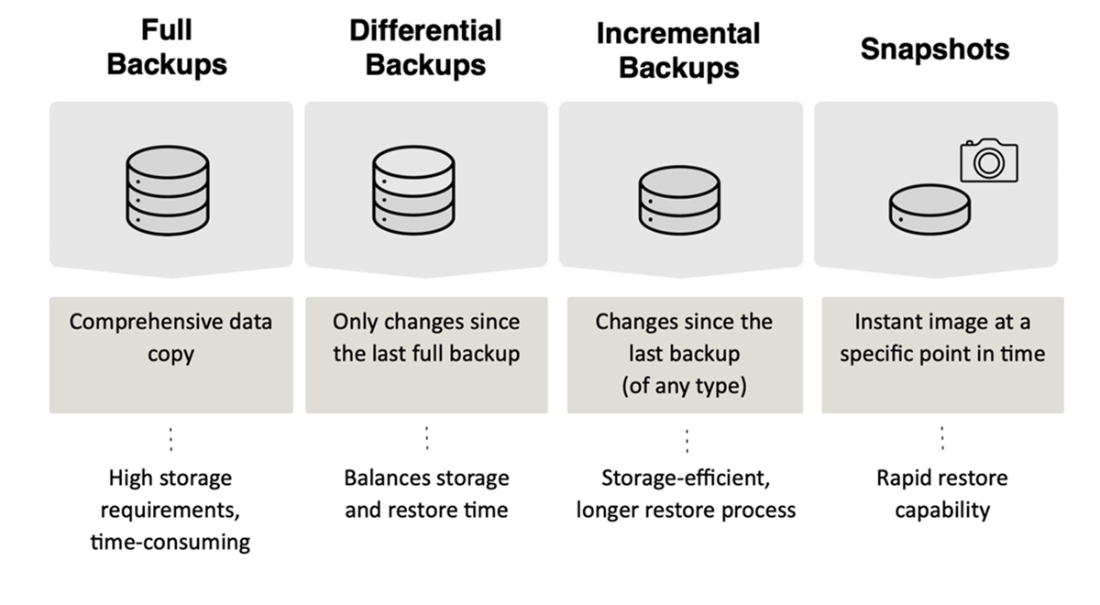
Compare full backups with differential and incremental methods by their characteristics and use cases. section 7.2


How Fundamentals of Cybersecurity covers it

How deep it goes
Defines full backups, compares their storage and time costs with other methods, and gives a weekly server example.
Examples
Illustrates a Sunday-night full backup that copies all data on an organization's servers.
What you can do after
Apply backup choices by weighing storage needs, completion time, recovery requirements, and operational constraints.
How it connects
Connects full backups with differential backups, incremental backups, snapshots, and disaster recovery.

Also explained in

Compare how 2 books explain full backup →

Related concepts

This explainer was generated by Manning's knowledge graph from the text of Fundamentals of Cybersecurity. The section links point to the parts of the book it draws on.