A geolocation API obtains a device’s or user’s geographic location through a common .NET MAUI abstraction across iOS, Windows, macOS, and Android. Desktop estimates may use IP address and Wi-Fi data, while mobile devices can combine these with GPS. section 3.1
Use the API in a location-sharing flow:
- Check whether location permission has been granted; request it when necessary. section 3.1 section 3.2
- Create a GeolocationRequest, select an accuracy such as GeolocationAccuracy.Best, and call Geolocation.GetLocationAsync. section 3.2
- Use the returned latitude and longitude in an application workflow, such as constructing a Bing Maps link. section 3.2
FindMe!
A .NET MAUI app collects a user’s name, verifies LocationWhenInUse permission, retrieves the location, and shares a message containing the user’s name and a Bing Maps URL. section 3.1 section 3.2
Figure 3.3 .NET MAUI provides a geolocation API you can call in your code. This API is an abstraction of each platform’s individual API for accessing the user’s location, and this in turn is an abstraction of different techniques for physically locating your user.
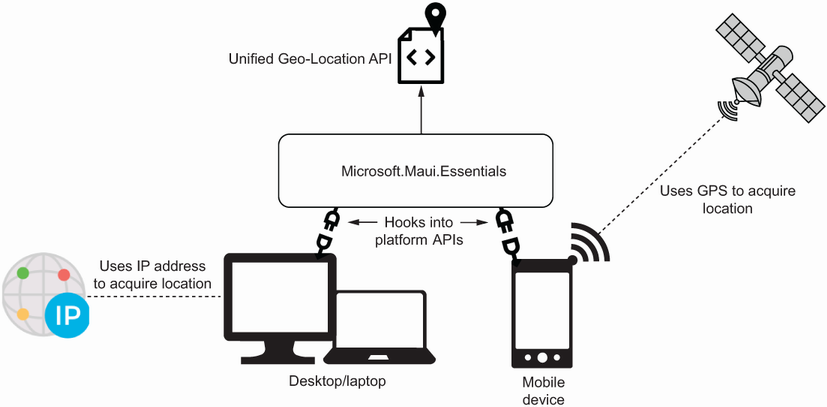
Shows how the .NET MAUI geolocation API abstracts platform-specific location APIs and physical location techniques. section 3.1
Figure 3.4 To access a user’s location, your app must request permission from the user. With .NET MAUI, you can check whether permission has been granted and request it from the user if not.
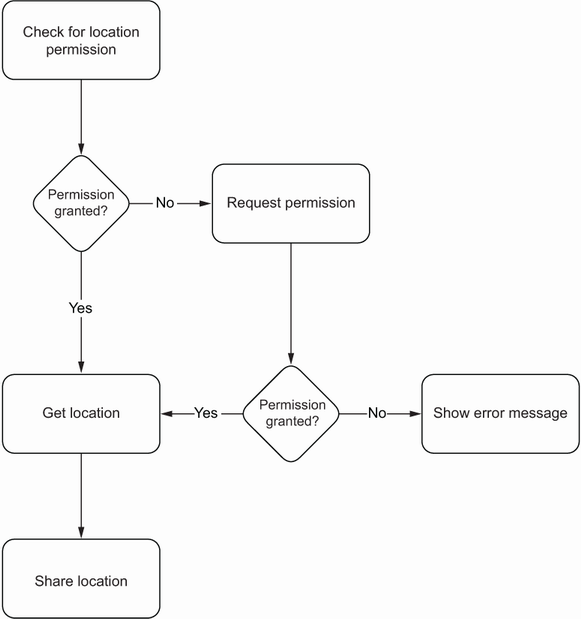
Shows the permission flow: check whether access is granted and request it when it is not. section 3.1
