git push transfers committed local repository changes to a remote repository so collaborators can download the updated codebase. It is the outbound step in a Git workflow that also uses git add, git commit, and git pull. section 2.3.2 section 2.6
For a repository connected to GitHub as origin, push the main branch with git push -u origin main. The -u option establishes the upstream relationship for the branch. section 2.3.1
A practical local-to-remote sequence is:
- Use git status to inspect created or modified files. section 2.3.2
- Use git add to stage selected files, then git commit -m to save a described snapshot. section 2.3.2
- Run git push -u origin main to publish the committed changes to the remote repository. section 2.3.2
Pushing a new feature branch
After creating and checking out rules_based_model, commit its changes and run git push --set-upstream origin rules_based_model. This creates the branch remotely and publishes the local branch changes without changing main. section 2.5.1
Figure 2.10 This diagram shows a sample Git workflow from using git init to initialize a new local repo, to git push to update a remote repository with local changes, and git pull to get the latest updates from the remote repo.
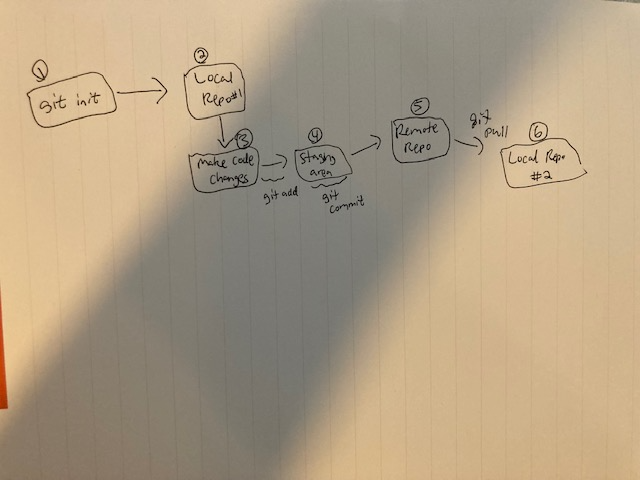
Follow the complete workflow from initializing a local repository through pushing local changes and pulling remote updates. section 2.6