GitHub Actions automates engineering work in GitHub through event-driven workflows. It supports CI/CD, but also tasks such as issue triage and documentation automation. A workflow is a YAML file stored under .github/workflows; triggers start it, jobs run on runners, and sequential steps perform commands, scripts, or reusable actions. section 1.0 section 1.2 section 1.6
Design a workflow around a trigger and the work that must follow. Jobs run in parallel by default; use needs to make later jobs wait for earlier ones. A runner may be a GitHub-hosted Linux, macOS, or Windows machine, or a self-hosted runner. Environments can protect deployment jobs with approvals, wait timers, and protected secrets. section 1.2 section 1.2
Figure 1.3 The basic syntax and elements that make up a GitHub Actions workflow
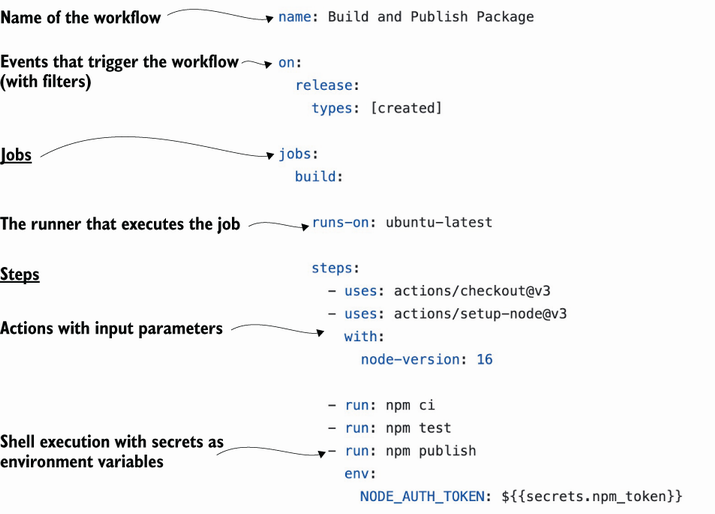
Use the workflow-elements diagram to connect YAML structure to the trigger, jobs, steps, runners, and reusable actions that execute an automation. section 1.2
Build workflows from these operational pieces:
- Triggers select repository events, including pushes, pull requests, issue changes, labels, and stars. section 1.2 section 1.3
- Jobs define units of work and their runner; steps inside each job execute sequentially. section 1.2
- Actions are reusable steps, available from the Marketplace or authored in JavaScript, TypeScript, containers, or composite wrappers. section 1.1 section 1.2
- Checkout is explicit: workflows do not automatically clone the repository, so CI jobs should add a Checkout action before building or testing code. section 1.3
Triage an issue without checking out code
A workflow can trigger when an issue is opened or edited, inspect its body, and apply bug, feature, or needs-triage labels. Because this task only uses the event payload, it can avoid cloning the repository and finish faster. By contrast, a CI job checks out the repository before it builds and tests. section 1.3 section 1.3
Treat runner choice as an operational decision. GitHub-hosted runners are available for public repositories without charge, while private-repository usage consumes included or purchased minutes and storage. Linux, Windows, and macOS consume minutes at different rates; self-hosted runners avoid Actions-minute charges but require hosting and security management. GitHub Enterprise Server requires self-hosted runners, unlike cloud offerings with GitHub-hosted runners. section 1.4.4 section 1.4.2 section 1.4.3
When selecting Marketplace actions, inspect their listing and use verified creators as a trust signal. Add an action with uses, supply optional inputs under with, and give shell steps readable names for workflow logs. Commit a workflow to the main branch to let a push trigger start its run. section 2.3 section 2.3









