When API teams need to change gateway configuration, routing every request through a central operations queue can slow delivery. GitOps lets developers propose changes in Git while retaining review, approval, and an audit trail. The desired configuration lives in a version-controlled environment repository; changes go through pull requests rather than an admin UI. section 1.2 section 1.5.6
A GitOps workflow has four parts:
- Declare the desired state in configuration files without prescribing the commands or API calls that will implement it. section 9.4.1
- Version the files in Git and review changes through pull requests; access controls and history make changes auditable. section 9.4.1
- Have an automated agent or deployment pipeline pull the desired state and apply it to the target environment. section 9.4.1
- Continuously compare deployed state with desired state. On detecting drift, an agent can alert and restore the declared configuration. section 1.5.6
An API gateway change
A developer updates the gateway configuration file and opens a PR. After operations reviews and approves it, automation applies the change. If someone changes the gateway through its admin UI, reconciliation detects the difference and restores the Git-defined state. To roll back a configuration change, revert its Git commit; the automated process then applies the reverted state. section 1.2 section 1.5.6
Plan for repository conflicts when multiple CI processes open automated PRs: retries or splitting configuration repositories can reduce collisions, but more repositories increase administration. GitOps also does not prescribe secrets management. Do not put private keys, passwords, or certificates in Git merely to keep all configuration together; repository history persists and is available to people who can clone it. section 9.4.3
Figure 1.4 APIOps is based on the GitOps approach of having the desired configuration state of the API gateway, and services are defined declaratively in an environment repository in Git. Dev teams make all changes to the desired system state via Git, and operations teams can review and approve. Software agents automatically detect any difference between the deployed state and the desired state (as defined in the environment repository). If the agent detects a drift, it automatically deploys the desired state to the specified environment so the actual state matches.
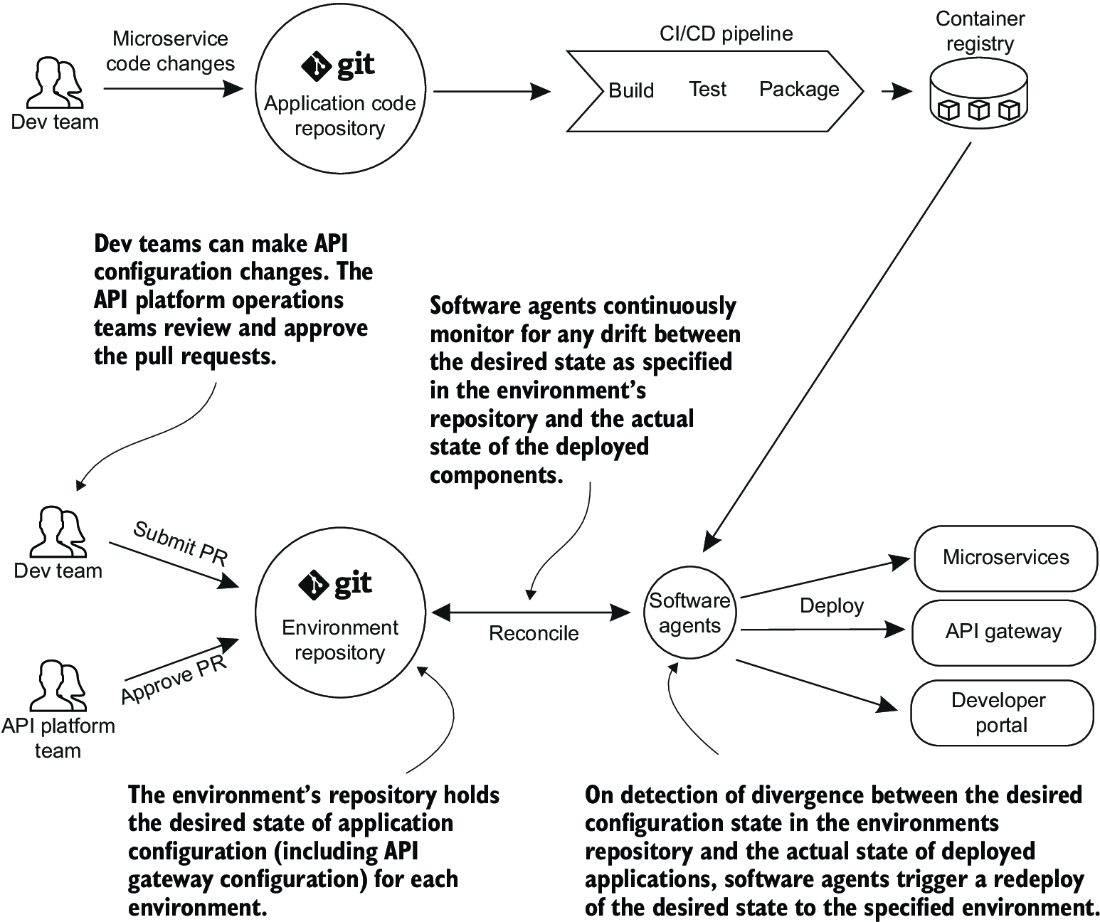
Trace the route from a Git PR to the declared API gateway state, then the agent’s comparison with the deployed state and its response to drift. section 1.5.6





