groupBy divides a data frame into subsets defined by values in one or more grouping columns, then lets you compute a result for each subset. It is the natural tool for questions such as “What is the average taxi cost for each passenger count?” or “How many cities are in each state?” Rather than writing a Python loop over each possible key, select the grouping column, select the value column to analyze, and apply an aggregation such as mean or count. section 6.6 section 11.2
A useful way to plan a grouped query is to answer four questions: Which data frame are you using? Which column supplies the groups? Which column or columns are being analyzed? Which aggregation will be run? Group values are commonly categories or a limited set of integers. The distinct values of the grouping column become the index values of an aggregated result. section 6.6
Average taxi fare by passenger count
For a taxi data frame, group rows by passenger_count, choose total_amount, and calculate the mean: df.groupby('passenger_count')['total_amount'].mean() The result is a Series: its index contains the unique passenger counts, and each value is the mean total_amount for that subset. This does the conceptual work of filtering total_amount for every passenger count and averaging each selection, but returns a useful pandas object and avoids an inefficient loop over the data frame. section 6.6
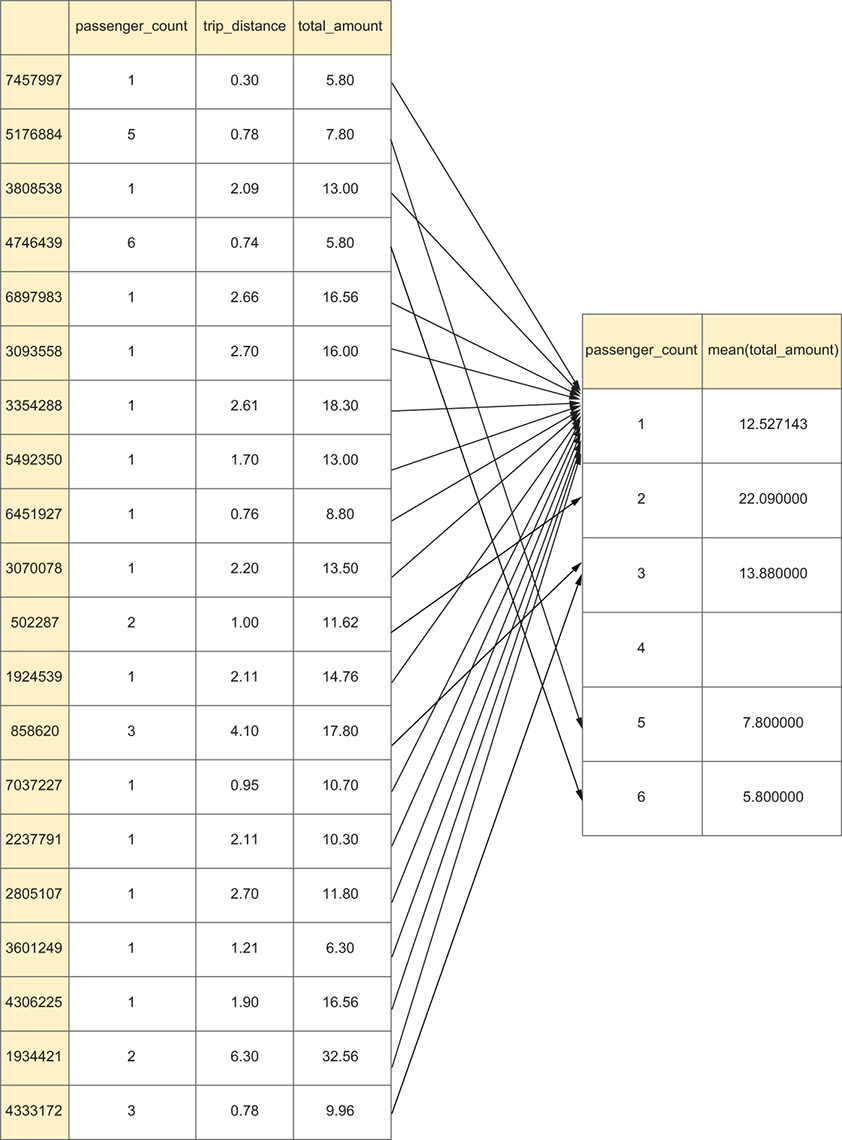
This diagram helps connect the grouping key, each subset of rows, and the final mean returned for every group. section 6.6
Grouped results are ordinary pandas results that can be extended in a method chain. Sort by computed values when you want to rank groups, or sort by the index when you want the group labels in order. For example, sorting average taxi costs exposes the least- and most-expensive passenger-count groups. section 6.6 section 8.2
Compare employment salaries
To compare reported annual compensation across employment types, make Employment the grouping key and ConvertedCompYearly the measured column: so_df.groupby('Employment')['ConvertedCompYearly'].mean().sort_values(ascending=False) Each output row corresponds to a distinct employment value. Missing salary results can make comparison harder, so the result can be followed by dropna and then formatted with apply. Sorting, cleaning, and formatting happen after the groupwise mean has produced the comparison Series. section 8.2
Extend groupBy when the analytical question changes shape:
- Bin a continuous measure with pd.cut before grouping. Trip distance can become short, medium, and long groups, then support a mean passenger-count comparison. section 6.6
- Count a selected column rather than every column when only one count matters. Grouping cities by state and counting city produces one value per state. section 11.2
- Sort an aggregated Series before plotting it. A state-level city count can feed directly into a bar plot, with figsize adjusted for many categories. section 11.2
groupBy is especially valuable because its output remains analyzable: sort it, remove missing values, format it, or plot it. Treat the returned index as part of the answer, since it identifies which group produced each aggregate. Start with one grouping key and one measured column; then experiment with different aggregations and ordering to make the comparison answer the question clearly. section 6.6 section 11.2





