A heap dump is a diagnostic snapshot of an application’s Java heap at a specific moment. It records objects stored in memory, their values, and relationships between references. This makes it useful when an application crashes or cannot be profiled, especially after an OutOfMemoryError. section 1.2.4 section 10.0
Use a heap dump to investigate memory allocation problems, memory leaks, excessive object retention, and inefficient data structures. An OutOfMemoryError identifies the failure, but not necessarily the code that retained the objects; the dump provides evidence about what remained in memory and why. section 5.2.3 section 10.4
Obtain and inspect a heap dump through a practical investigation:
- Configure the Java process to create a dump automatically when an OutOfMemoryError occurs. section 10.1
- Capture a running local process with VisualVM by selecting the process and clicking Heap Dump in the Monitor tab. section 10.1.2
- Generate a dump with command-line tools such as jcmd or jmap, or obtain one programmatically through framework capabilities. section 10.1
- Open the dump in VisualVM, verify its file and system summary, then inspect the Objects view. section 10.2
- Sort object types by instance count or retained size, find the first type from the application codebase, and trace its references back to fields or collections. section 10.2
A growing Product list
A Java application repeatedly adds Product objects containing generated String values to a static ArrayList. The list retains the objects, so memory fills until an OutOfMemoryError occurs. A heap dump reveals that Product and String instances occupy much of the heap, while reference inspection shows the ArrayList holding more than one million objects through a static field in Main.
Figure 10.3 Click the Heap Dump button in VisualVM’s Monitor tab to get a heap dump for the selected process. VisualVM opens the dump as a tab, and you can further investigate it or save it anywhere you want.
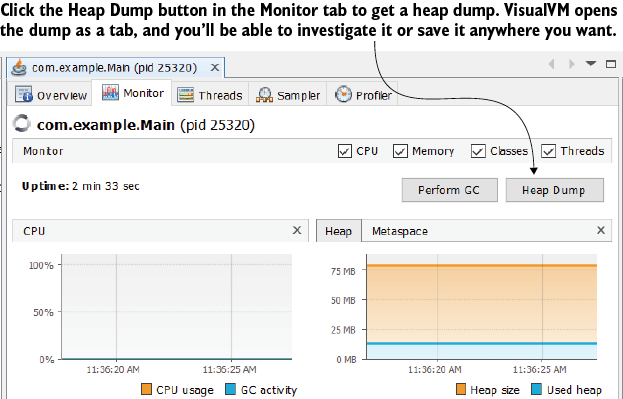
VisualVM’s Heap Dump control provides a concrete starting point for capturing and opening a dump from a selected running process. section 10.1.2

