Object Query Language (OQL) retrieves and examines objects, attributes, and references in a heap dump. It is useful when a crashed or inaccessible application cannot be investigated with a profiler, especially when manual browsing is too slow. section 10.0 section 10.4
Use OQL to answer focused diagnostic questions:
- Which objects of a given type remain in the heap? section 10.3
- What values do those objects contain, such as product names or name lengths? section 10.3
- Which objects refer to them and may prevent garbage collection? section 10.3
- How do object populations or references differ between heap dumps? section 10.3
Querying retained Product objects
In VisualVM's OQL console, select Product instances with `select p from model.Product p`. Narrow the result with `where p.name.value.length > 15`, project several values as JSON, or inspect unique referrers with `select unique(referrers(p)) from model.Product p`. A single retaining object can reveal why garbage collection cannot remove the instances. section 10.3
Figure 10.9 To switch to the OQL view in VisualVM, choose OQL Console from the drop-down menu in the upper-left corner of the heap dump tab.
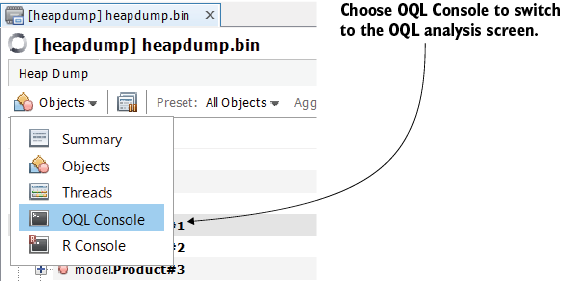
Open VisualVM's OQL Console from the heap-dump tab, enter a query, run it, and inspect the returned instances. section 10.3
