The href attribute gives an HTML link its destination. Think of the <a> element as a signpost: href tells the browser where the sign points when someone clicks it. section 1.16 section 2.22
A link to another page
<a href="wordplay.html">Play with words</a> Here, href points to the local file wordplay.html, while the text between the opening and closing <a> tags becomes the clickable link. section 2.22
Build an href link in a few small steps:
- Start with an opening <a> tag. section 2.22
- Add href="destination" inside the tag, using quotation marks around the destination. section 1.16
- Use a filename for a local page or a full URL for a remote page, then add descriptive link text and </a>. section 2.22
- Check capitalization carefully in URLs and filenames; a case error can lead to a 404 Not Found result. section 2.22
A link to another website
<a href="http://wordspy.com/index.php">Visit the site</a> This time, href contains the full address of a remote page. Lowercase attribute names are the readable, maintainable convention. section 2.22 section 1.16
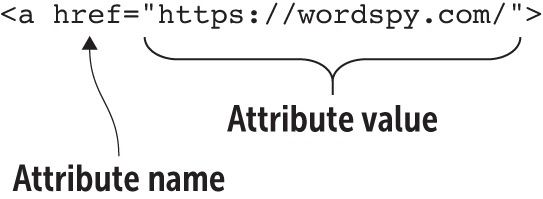
View the figure to see href used as an attribute that supplies an anchor’s link address. section 1.16


