The href attribute tells a link where to go. Place it inside an <a> element, set it to an address, and wrap the clickable words between the opening and closing tags. href means “hypertext reference”—a fancy name for a destination address. section 2.15 section 2.2
Choose the href value according to the destination:
- Local page: use the filename when the linked file is in the same directory, such as href="wordplay.html". section 2.15 section 2.16
- Remote page: use the full URL, such as href="https://webdesignplayground.io/". section 2.2 section 2.16
- Same-page location: point to an element’s id with a hash, such as href="#details". section 16.7
A complete link
<a href="wordplay.html">Explore wordplay</a> The browser displays “Explore wordplay” as clickable text. Clicking it opens wordplay.html. Keep the quotation marks around the address, and check capitalization carefully: a mismatched filename or directory letter can lead to a 404 Not Found error. section 2.15
Figure 2.7 The syntax to use for the <a> tag
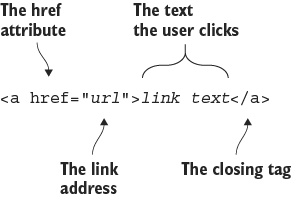
Use the syntax figure to see how the <a> element, href attribute, destination address, and clickable link text fit together. section 2.15


