HTMX adds small, targeted interactions to HTML pages without requiring you to write JavaScript. An element can make an HTTP request and replace part of the currently loaded page with the HTML returned by a Django view. Instead of treating every interaction as a full-page navigation, treat a URL response as a page fragment. section 1.2.2 section 12.1
This approach fits database-backed CRUD applications that benefit from a sprinkling of interactivity but do not need the browser to behave like a full single-page application. Heavier frameworks remain appropriate for highly interactive work such as a web spreadsheet; HTMX keeps the project close to conventional Django views and templates. section 12.0 section 12.1
HTMX behavior is expressed through hx- attributes placed on HTML tags:
- hx-get invokes a GET request when its element is interacted with; on an input, its value can be included as a URL query parameter. section 12.2
- hx-post submits a POST request, including form data when attached to a form control. section 12.2 section 12.5
- hx-target identifies the element to update, while hx-swap controls how returned content is inserted; innerHTML replaces the target’s contents. section 12.2
- hx-trigger chooses when a request fires, including key presses, page load, or an element becoming visible. section 12.2
Figure 12.1 Using HTMX attributes to change a link into an action that replaces a portion of the page
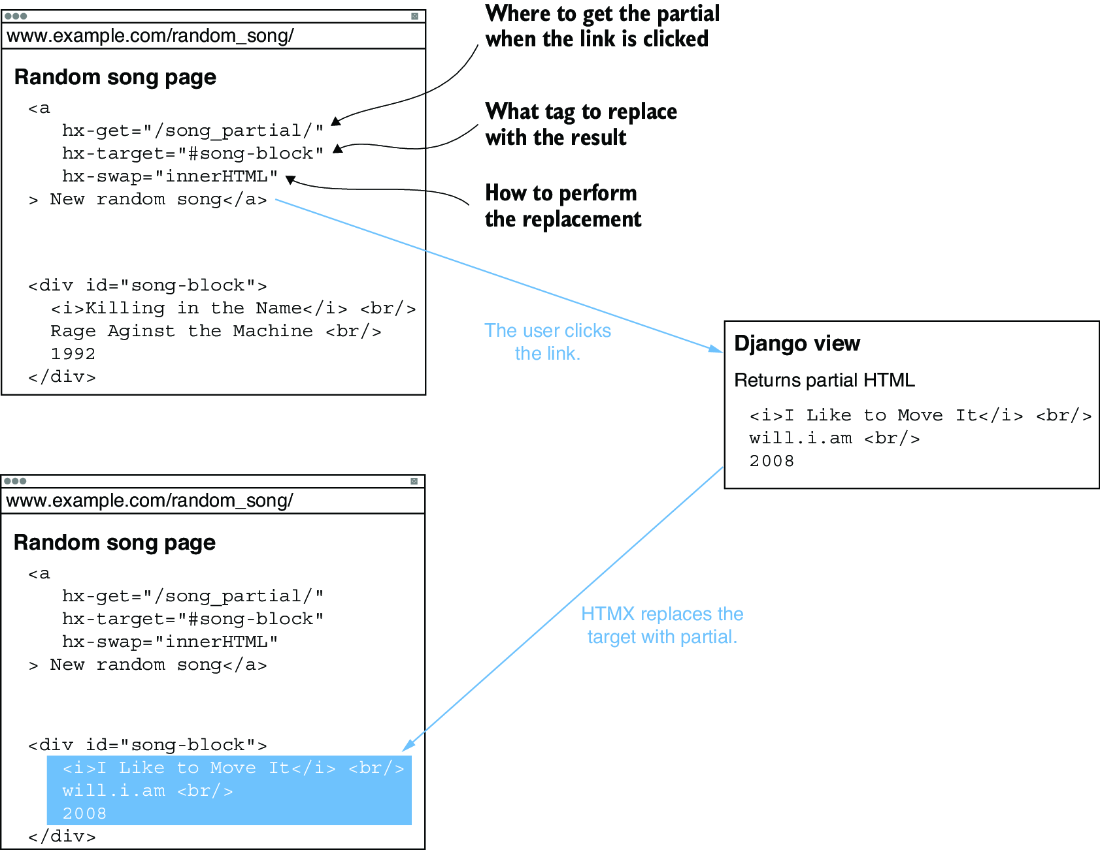
A link can issue an HTMX request and replace a selected part of the page with the server response, rather than reload the whole page. section 12.2
Lazy-load a promoters list
Render the main promoters page immediately with a div containing a loading message. Give that div hx-get pointing to a second Django view and hx-trigger="load". Once the page loads, HTMX calls the view; the view renders only a promoters-list partial, and that response replaces the placeholder. Keep partial templates together in a partials directory, and register both the main and partial URLs. section 12.3
Edit a room in place
Render each venue room as a partial with an Edit link. The link uses hx-get and hx-target to replace that room row with an edit-form partial. The Save button uses hx-post to submit the form to the same view; after valid data is saved, the view returns the display partial, restoring the row. A Cancel button GETs a display-only partial. Restrict each view to the signed-in user’s related venue or room. section 12.5
Add the HTMX library script to the base template so its attributes are active across the site. Django views serving HTMX requests commonly return partials rather than complete pages; the usual URL routing, templates, forms, validation, authentication, and CSRF protections still apply. section 12.3 section 12.2 section 12.5

