HTTPS is HTTP secured with Transport Layer Security (TLS). It protects communication by verifying the remote endpoint and encrypting data between a browser and web server, reducing the impact of intercepted traffic. section 16.4.1 section 16.4.2
HTTPS combines several mechanisms during connection setup:
- The server provides a certificate containing a publicly shareable key. section 16.4.1
- The browser verifies the remote side during the initial handshake. section 16.4.1
- The browser sends a randomly generated session key encrypted with the server’s public key. section 16.4.1
- TLS then uses symmetric encryption for traffic, while asymmetric encryption protects the key exchange. section 16.4.1
Securing an Airflow endpoint
An Airflow api-server can use a private key and certificate through AIRFLOW__API__SSL_CERT=/path/to/certificate.pem and AIRFLOW__API__SSL_KEY=/path/to/privatekey.pem. After startup, the endpoint changes from http://localhost:8080 to https://localhost:8080. Keep the private key secret; a certificate may be shared. section 16.4.2
Figure 16.14 At the start of an HTTPS session, the browser and web server agree on a mutual session key to encrypt and decrypt traffic between the two.
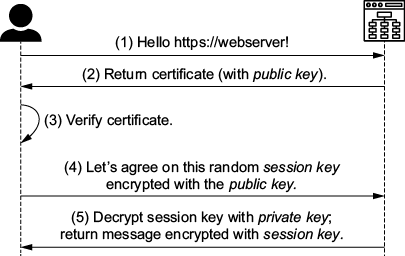
The handshake diagram helps trace how the browser and server agree on a mutual session key before encrypting traffic. section 16.4.1
Listing 16.5 Creating a self-signed certificate
openssl req \
-x509 \
-newkey rsa:4096 \
-sha256 \
-nodes \
-days 365 \                          #1
-keyout privatekey.pem \             #2
-out certificate.pem \               #3
-extensions san \                                  #4
-config \                                           #4
 <(echo "[req]";                                    #4
   echo distinguished_name=req;                     #4
   echo "[san]";                                    #4
   echo subjectAltName=DNS:localhost,IP:127.0.0.1   #4
   ) \                                              #4
-subj "/CN=localhost"                               #4
The certificate-generation listing provides a concrete localhost setup using OpenSSL, a private key, and a self-signed certificate. section 16.4.2






