Hyperparameter tuning searches user-chosen settings for values that improve a single numeric objective, such as accuracy or error. Optuna treats the search as a machine-learning task: it predicts promising settings, evaluates them, updates its model, and chooses the next trial. section 5.4.1
A practical Optuna workflow is:
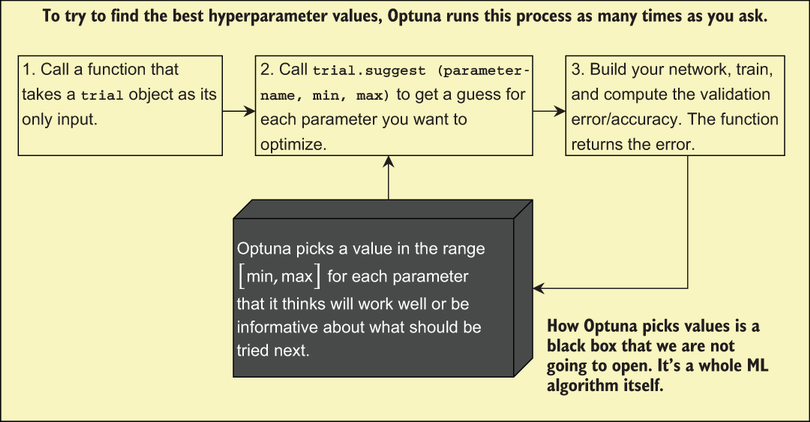
- Define an objective function that receives a trial, requests bounded values with trial.suggest functions, trains or evaluates a model, and returns a float. section 5.4.1
- Create a study with a direction such as minimize, then call optimize with a chosen number of trials. section 5.4.1
- Reuse nearby solutions when searching expensive linear models: warm-starting one regularization value from another can reduce training cost. section 13.2.3
Toy objective
For f(x, y) = abs((x−3)(y+2)), request x and y within [−10, 10], minimize the function for 100 trials, and inspect study.best_params. Optuna approaches x = 3 and y = −2. section 5.4.1
Figure 5.16 You supply Optuna with a function that does the three steps outlined in this diagram. Optuna uses its own algorithm to pick values for each hyperparameter, which you tell Optuna about using the trial.suggest functions; this function also informs Optuna about the minimum and maximum values you want to consider. You tell Optuna how many times to do this process, and each time it does, the black box gets better at picking new values to try.
Trace the trial loop from supplying the objective and parameter ranges to progressively better guesses. section 5.4.1