A hypertext link is a clickable word, phrase, or image that points to another web page. The browser follows that reference when someone clicks it. section 1.1
HTML creates links with the <a> element. Put the destination in its href attribute, then place the clickable text between the opening and closing tags. section 2.15
Choose the href value according to where the destination lives:
- Use a local page filename when linking to another page in the same directory. section 2.15
- Use the destination's full URL when linking to a page on another website. section 2.15
- Enter directory and filename capitalization carefully; a case mismatch can lead to a 404 Not Found error. section 2.15
A small link
Use <a href="wordplay.html">Wordplay</a> to make “Wordplay” clickable and send visitors to the local wordplay.html page. For a remote destination, replace the filename with its full URL. section 2.15
Figure 2.7 The syntax to use for the <a> tag
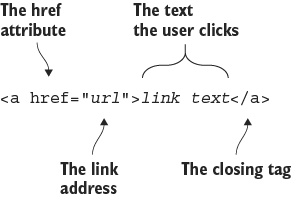
Inspect the visual syntax breakdown for the <a> tag, including its href attribute and clickable content. section 2.15








