Need a server without buying one? Infrastructure as a service (IaaS) lets you rent computing, networking, and storage from a cloud provider. Virtualization divides physical resources into virtual machines (VMs), giving you control over a computing environment without owning its hardware. section 1.1 section 3.1.1
Figure 1.2 Cloud computing abstraction layers. The responsibility shifts between you and the cloud provider across IaaS, PaaS, and SaaS. As you move up the layers, the provider manages more—from physical infrastructure and virtualization in IaaS, to the OS and runtime in PaaS, and nearly everything in SaaS—leaving you to focus on just your applications and data.
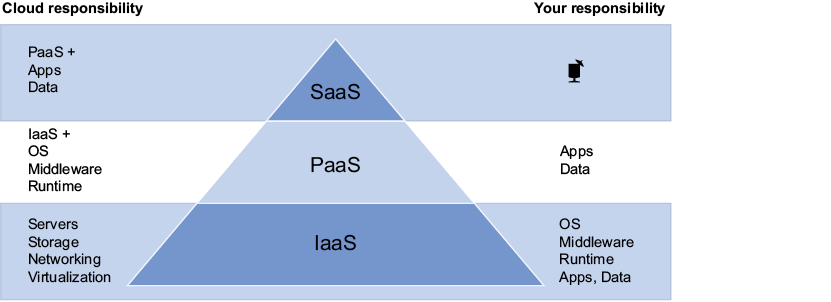
The abstraction diagram shows where responsibility shifts: IaaS leaves you more to manage than platform as a service (PaaS) or software as a service (SaaS). section 1.1
The trade-off is control in exchange for work:
- Azure manages the physical servers, network, and storage. You manage the VM’s operating system, applications, network access, users, and data access. section 6.2.2
- Choose the VM’s region and size with price, capacity, performance, and availability in mind. Connect it to a virtual network, and secure any remote-access ports you open. section 3.8
- Maintain the software you install and decide its life cycle. Azure Automanage can take on some VM upkeep, including updates, monitoring, backup, and security best practices. section 3.1.4
A small legacy application
Suppose three people still need a legacy application. A VM gives you a full machine on which to run it without purchasing hardware. You retain control of the software and its maintenance schedule; choosing IaaS does not make those jobs disappear. section 3.1.4
You can create an Azure VM through the portal, CLI, PowerShell, or templates. Start with the capacity you need, monitor its use, and consider auto shutdown when it is idle. Spot instances cost less but can be reclaimed; reserved instances offer savings when you can commit to running a VM for one to three years. section 3.8
Figure 3.7 Self-manage your VM and be in charge of policies and configurations, or use Azure Automanage to let Azure apply update patches and security best practices.
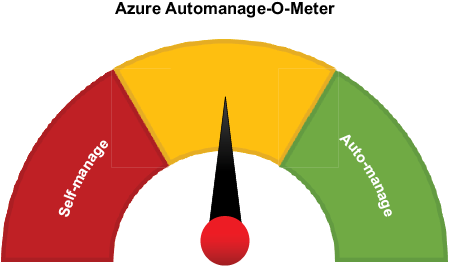
The self-management versus Automanage diagram helps you decide how much routine VM configuration and patching to handle yourself. section 3.1.4



