A group is an identity label carried by authentication credentials and used by RBAC authorization. Kubernetes does not maintain ordinary users or groups in a built-in directory; client certificates can provide a username and optional group information. section 3.2 section 3.4
Use groups when permissions should apply to multiple identities:
- Place the user name in the certificate common name (CN) and the group in the organization (O), such as CN=carol/O=developers. section 3.2
- For a Kubernetes CertificateSigningRequest, declare the group under spec.groups and request client authentication. section 3.2
- Bind a Role or ClusterRole to the group through a RoleBinding or ClusterRoleBinding; the binding supplies the permissions. section 3.4 section 9.3.2
- Verify the effective access by switching to the user context and running kubectl auth can-i or an allowed and forbidden operation. section 3.2 section 3.4
Give the developers group pod-reader access
Create or retain a pod-reader Role, then bind it to the developers group with kubectl create rolebinding pod-reader-bind --role=pod-reader --group=developers. After switching to Carol's kubeconfig context, kubectl get po succeeds while kubectl delete po nginx returns Forbidden. Replacing the binding with the group subject grants the same role without changing Carol's certificate. section 3.2
Figure 3.11 Creating a kubeconfig for a new user and generating a certificate using the certificate signing request
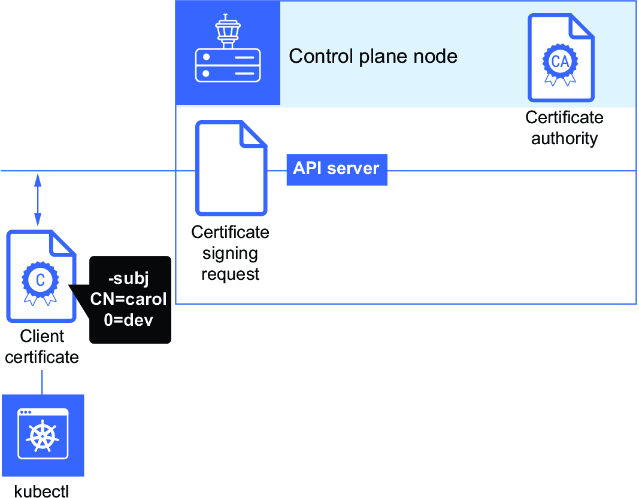
Trace the operational path from certificate identity and group assignment through kubeconfig creation and API access. section 3.2

