A group is a named collection of entities that can be referenced together in an access policy. Instead of granting the same rule to each principal or resource individually, a policy can apply it once to the group. For example, members of Customer-CustCo-Users can be allowed to view documents owned by CustCo. Groups therefore reduce repeated policy entries when a shared access rule follows membership. section 4.3.2
Groups organize identity; roles express authorization logic. A department or team group in an identity provider such as LDAP or Active Directory identifies related users, while a role links a job function to permissions and context. A group may map to a role or help determine a role assignment, and some systems blur the distinction. The practical distinction is that roles usually carry permission sets, hierarchies, separation-of-duties constraints, and formal governance, whereas groups often do not. section 5.2.1 section 4.3.2
Shared campaign folder
An access control list (ACL) can grant a Marketing team group read and write access to campaign plans while granting Bob individual access. When Doug, a Marketing team member, requests a document, his group membership can satisfy the ACL even though Doug is not named separately. This is useful for a stable shared folder, but the decision remains tied to that resource’s list rather than a centralized policy or organizational role. section 5.1 section 5.1.1
Figure 4.1 Relationships among key authorization terms. Principals, actions, and resources form the core of access decisions and are enriched with attributes, roles, and group memberships. All entities exist within namespaces and can be either principals or resources. The diagram also shows the legacy term subject as an older equivalent of principal and illustrates how actions operate on resources based on contextual and identity-based properties.
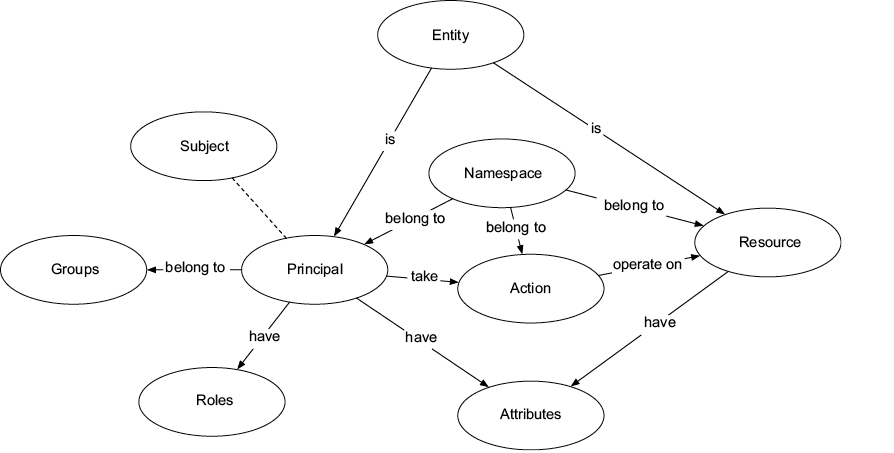
Use the relationship diagram to place group membership alongside principals, resources, actions, attributes, roles, namespaces, and policies in an authorization decision. section 4.3.2
Group-based control becomes harder to operate when membership or access conditions change frequently. As principals, actions, and resources multiply, administrators may need many group memberships and manual updates. In a health-record system, staff can belong to several departments and roles, while shift schedules, patient consent, and transient assignments create combinations that static groups do not express cleanly. These exceptions can multiply mappings and make cross-system coordination costly. section 1.2.1 section 1.2.4
For access needs that depend on more than membership, combine groups with policies, roles, attributes, or relationships. A policy system can retain a team-oriented rule while adding conditions such as ownership, managed devices, time restrictions, or external collaboration. Centralized, runtime-evaluated policies also avoid burying exceptions in application code and can be modified without redeploying the platform. section 9.0 section 5.2.1

