When deploying a Streamlit app to AWS, an IAM policy defines which services a user or role can access. Attaching policies directly to a dedicated IAM user limits access scope and supports stronger security controls. section 12.3.4
A deployment setup attaches policies for the services it needs:
- AdministratorAccess-AWSElasticBeanstalk grants Elastic Beanstalk access. section 12.3.4
- AmazonEC2FullAccess grants EC2 access. section 12.3.4
- AmazonS3FullAccess grants S3 access. section 12.3.4
Preparing deployment credentials
Create an IAM user, attach the required policies, and generate an access-key and secret-access-key pair. Store the pair safely because AWS will not display it again. section 12.3.4
Figure 12.6 Adding the appropriate permissions for an IAM user
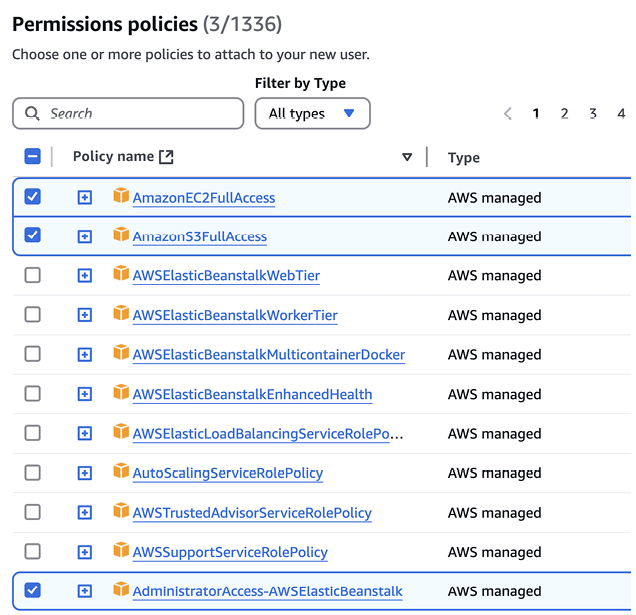
Use the console view to identify the permission-policy choices during IAM user creation. section 12.3.4


