Implicit grid placement lets CSS Grid handle items whose exact number or position is unknown. Defining tracks with grid-template-* creates the explicit grid; items placed beyond those tracks cause additional implicit tracks to be generated automatically. section 5.4
The browser applies these rules when implicit tracks are needed:
- Implicit tracks default to auto sizing, growing enough to contain their items. section 5.4
- grid-auto-columns and grid-auto-rows set a different size for all implicit tracks, such as 1fr. section 5.4
- Negative grid-line numbering still begins from the bottom or right edge of the explicit grid. section 5.4
- Automatic placement is useful when many items must flow naturally, especially when their count comes from a database. section 5.4 section 5.7
Photography portfolio
Define responsive columns while leaving the rows implicit: .portfolio { display: grid; grid-template-columns: repeat(auto-fill, minmax(200px, 1fr)); grid-auto-rows: 1fr; grid-gap: 1em; }. As images wrap onto new lines, CSS Grid adds rows automatically, so the layout does not depend on a fixed number of photographs. section 5.4
Figure 5.11 If a grid item is placed outside the declared grid tracks, implicit tracks will be added to the grid until it can contain the item.
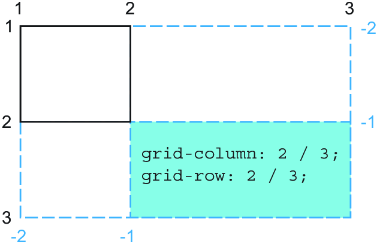
See how placing an item beyond the declared tracks causes CSS Grid to add implicit tracks until the item fits. section 5.4

