An in-person session brings participants into the same physical location for collaborative modeling. Physical presence supports relationship building, spontaneous conversation, movement, and observation of nonverbal communication, while requiring deliberate attention to participation and documentation. section 5.5 section 5.5.1
Facilitate the room to make participation easier:
- Remove unnecessary chairs and tables so participants can move easily and approach the modeling space. section 4.2.2
- Keep enough seating for participants who cannot stand for long periods, and schedule regular breaks. section 4.2.2
- Watch gazes, gestures, body language, positioning, and group forming for signals that may remain invisible online. section 5.5.1
- Notice that intimidating participants can make others quieter, even when the room appears engaged. section 5.5.1
The chairs in the corner
A carefully prepared room left chairs stacked in the corner. One participant took a chair, everyone followed, and the group continued answering questions without returning to the modeling space. Removing unnecessary chairs afterward made standing, moving stickies, and participating more natural. section 4.2.2
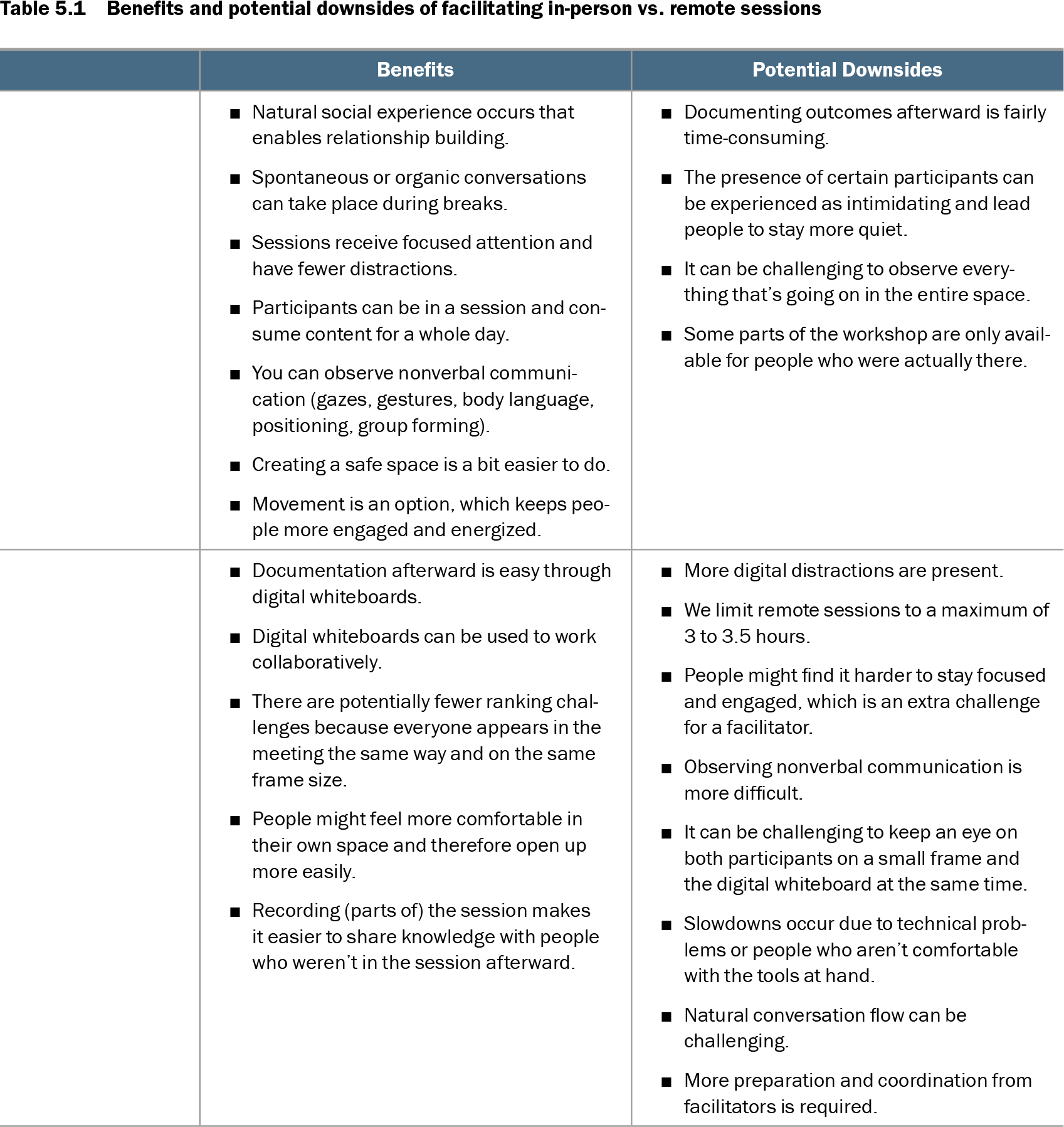
Table 5.1 Benefits and potential downsides of facilitating in-person vs. remote sessions (view table figure)
|
Benefits |
Potential Downsides |
| In-person session |
- Natural social experience occurs that enables relationship building.
- Spontaneous or organic conversations can take place during breaks.
- Sessions receive focused attention and have fewer distractions.
- Participants can be in a session and consume content for a whole day.
- You can observe nonverbal communication (gazes, gestures, body language, positioning, group forming).
- Creating a safe space is a bit easier to do.
- Movement is an option, which keeps people more engaged and energized.
|
- Documenting outcomes afterward is fairly time-consuming.
- The presence of certain participants can be experienced as intimidating and lead people to stay more quiet.
- It can be challenging to observe everything that’s going on in the entire space.
- Some parts of the workshop are only available for people who were actually there.
|
| Remote session |
- Documentation afterward is easy through digital whiteboards.
- Digital whiteboards can be used to work collaboratively.
- There are potentially fewer ranking challenges because everyone appears in the meeting the same way and on the same frame size.
- People might feel more comfortable in their own space and therefore open up more easily.
- Recording (parts of) the session makes it easier to share knowledge with people who weren’t in the session afterward.
|
- More digital distractions are present.
- We limit remote sessions to a maximum of 3 to 3.5 hours.
- People might find it harder to stay focused and engaged, which is an extra challenge for a facilitator.
- Observing nonverbal communication is more difficult.
- It can be challenging to keep an eye on both participants on a small frame and the digital whiteboard at the same time.
- Slowdowns occur due to technical problems or people who aren’t comfortable with the tools at hand.
- Natural conversation flow can be challenging.
- More preparation and coordination from facilitators is required.
|
Compare in-person and remote sessions across social connection, breaks, attention, nonverbal observation, safety, movement, intimidation, and outcome documentation. section 5.5.1