An integration test applies infrastructure modules or configuration to a testing environment, then dynamically checks whether multiple resources interact and reach the expected state. section 6.4
Use an infrastructure integration test to:
- Render configuration when necessary and deploy the change to isolated or persistent test infrastructure. section 6.4.1 section 6.4.2
- Query the infrastructure provider’s API and compare active resources with the intended IaC configuration. section 6.4.1
- Verify creation, updates, configuration, dependencies, availability, or runtime state rather than duplicating a tool’s acceptance tests. section 6.4.3 section 6.8
- Remove temporary resources after validation, or retain a persistent environment when creation is costly, dependency-heavy, or unsafe to repeat. section 6.4.1 section 6.4.3
Choose the lifecycle according to risk and dependency structure. Low-level modules such as networks or DNS often benefit from realistic in-place updates, while simpler modules can use create-test-delete runs. Persistent environments protect production when resources are long-lived, expensive, or hazardous to destroy. section 6.4.2 section 6.4.3
Combine integration tests with unit and contract tests for modules, or with unit and end-to-end tests for complex environment configurations. Run them after faster checks and before production delivery; remove unreliable or redundant tests. section 6.7.1 section 6.7.2 section 6.7.3
GCP server module
A Python test generates a server configuration, applies it to a testing environment, waits for provisioning, queries Google Cloud through Libcloud, and passes only when the server reports a running state. A fixture then destroys the server and removes its generated configuration. The demonstrated run completes four tests in about three minutes. section 6.4.1
Figure 6.10 Integration tests usually create and update infrastructure resources in a testing environment, test their configuration and status for correctness or availability, and remove them after the tests.
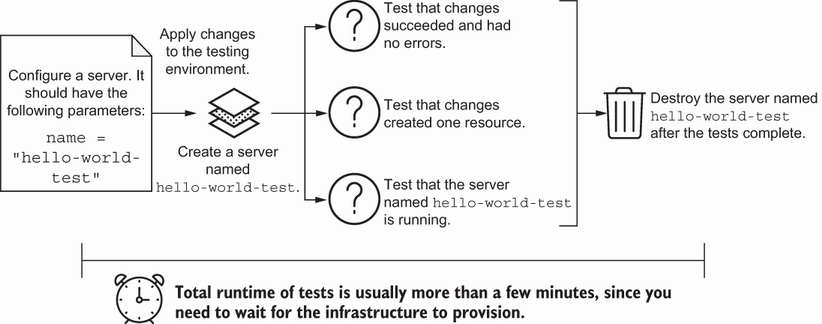
Use the lifecycle diagram to trace the standard create-or-update, verify, and cleanup flow. section 6.4.1






























