A read-eval-print loop (REPL) is an interactive environment that repeatedly accepts source code, evaluates it, and immediately prints the result. It supports low-cost experimentation without compiling and building a dedicated application. In F#, the REPL is called F# Interactive, or FSI. section 2.5.1
Use a REPL to try business logic, shape a domain model, test production code with prepared data, explore a NuGet package, or perform rapid data analysis. The short feedback cycle makes it practical for ideas that may be revised or discarded. section 1.5.1 section 2.5.1
A stateful FSI session lets you build on earlier expressions:
- Bind a value with `let version = 6`. section 2.5.4
- Use that value in a later expression, such as `$"F# {version} is cool!"`. section 2.5.4
- Load data once, then apply separate shaping, validation, or action operations to the resulting symbol. section 10.1.3
State is powerful but session-specific. Restarting FSI removes its bindings, even when the corresponding expressions remain in a script. Execute definitions in the required order, or later expressions will fail because FSI has not received their prerequisites. section 2.5.4
Explore orders without rerunning expensive work
Load `orders` once, then reuse it for different questions: calculate and sum order prices, or group orders and map them to printable labels. Separate setup from scratchpad operations so repeated experiments do not reload costly data. section 10.1.3
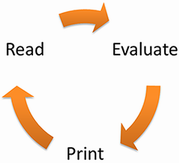
Follow the cycle from entered code through evaluation to printed feedback. section 2.5.1





