An ACH dashboard is a financial-software interface for working with Automated Clearing House transaction data. It makes transaction flow visible after ACH files enter a database, providing a practical starting point for features such as file handling, reporting, analytics, fraud monitoring, and transaction origination. ACH also connects to comparable payment systems in other countries, including EFT, SEPA, BACS, BECS, and NACH. section 1.2 section 1.4
The dashboard begins with a real operational problem: legacy workflows require operations staff to upload files before back-office users can select them, creating processing delay. Existing reporting is limited to file totals, so modernization aims to deliver more meaningful transaction insight while preserving a product experience consistent with other offerings. section 1.4
A useful implementation path builds the dashboard as an integrated application:
- Set up a web UI and use the dashboard as the place for file uploads and data views. section 6.9
- Connect the UI to APIs; begin with hardcoded data, then use mocked API calls so frontend work can proceed before the backend is complete. section 6.9
- Upload an ACH file, parse it, store it in a database, and visualize the results. section 7.0
- Test the interface and integrated MVP, then release it for customer feedback and later enhancement. section 6.9 section 7.0
Minimum viable ACH dashboard
A first release lets a user upload an ACH file, parses the file, stores its contents in a database, and displays the results in the dashboard. The focus is integration rather than major new functionality: individual pieces developed earlier must work together seamlessly before the product is shown to customers. section 7.0
A current implementation can use Next.js for an interactive React-based web application, with HTML, CSS, DOM principles, file-based routing, client-side rendering, server-side rendering, and styling choices. TypeScript can improve maintainability through explicit types and development-time error detection; Jest can test UI pages and ARIA-role accessibility. Docker-based deployment and environment variables support communication with mocked APIs during development. section 6.9
Figure 1.6 Modern ACH dashboard
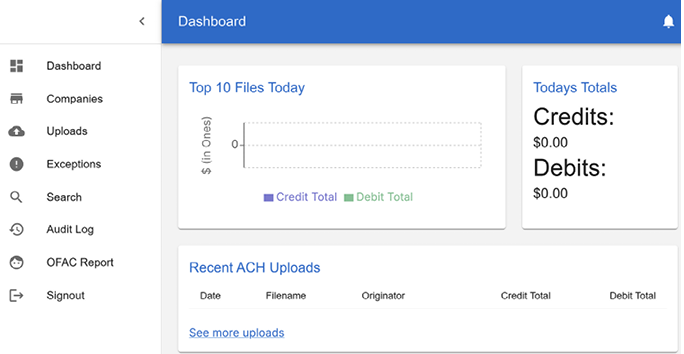
Compare the modern dashboard direction with the legacy interface to frame modernization as both a workflow and product-experience change. section 1.4
