Kind runs a local Kubernetes cluster by placing Kubernetes nodes inside Docker containers. It provides a fast, lightweight environment for practicing kubectl operations, exam-like tasks, and cluster troubleshooting on a laptop or desktop. section 1.2
Docker is the only stated requirement. A basic cluster can be created with one command, avoiding the time and complexity of manually building a cluster. Kind is similar in purpose to minikube and microk8s, but staged scenarios can differ between tools. section 1.2
Use these commands to inspect the resulting environment:
- Run docker container ls to view the node container, commonly named kind-control-plane. section 2.1.4
- Run kubectl get nodes or kubectl get no -o wide to verify node readiness, roles, version, and container runtime. section 2.1.4
- Use docker exec -it kind-control-plane bash to inspect a node directly, then use crictl ps to view running containers. section 2.1.4
Kind layers isolation through Linux cgroups and namespaces. Docker isolates the node container from the host, while another namespace and cgroup setup isolates pod containers inside the node; all layers still share the host kernel. The node uses containerd through Kubernetes’s container runtime interface. section 2.1.4
Stage and recover a missing node
A simple testing cluster may combine control-plane and worker responsibilities on one node, while multinode configurations separate them. To simulate a node failure, stop kubelet inside kind-worker with systemctl stop kubelet; kubectl get no then reports the worker as NotReady. Restart kubelet with systemctl start kubelet and verify recovery. section 2.1.4
Figure 2.12 kind cluster architecture, with nodes running as
containers on our local system
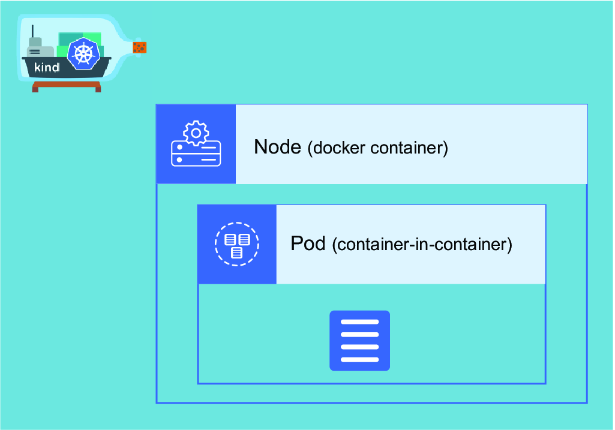
Use the architecture diagram to trace the nesting from the local system to Docker, node containers, and pod containers. section 2.1.4


