Kind runs local Kubernetes clusters by placing each control-plane or worker node inside a Docker container. The application containers deployed to Kubernetes run inside those node containers, keeping the entire cluster on the host system. section 3.1.3
Kind is useful for development and testing because it has a small resource footprint, supports multi-node clusters, and keeps running processes easy to inspect locally. Docker must already be installed. section 3.1 section 3.1.3
Kind fits into a local Kubernetes workflow as follows:
- Install the single Kind executable and create a default cluster with kind create cluster. section 3.1.3
- Use kubectl to interact with the cluster; creating a Kind cluster configures kubectl to use it. section 3.1.3
- Describe multiple nodes in a configuration file, then create them with kind create cluster --config kind-multi-node.yaml. section 3.1.3
- Inspect the node containers with kind get nodes or docker ps, then enter a node with docker exec. section 3.1.3
Create a three-node cluster
A configuration can define one control-plane node and two worker nodes: kind: Cluster, apiVersion: kind.sigs.k8s.io/v1alpha4, and nodes with roles control-plane, worker, and worker. Run kind create cluster --config kind-multi-node.yaml, then verify the containers with kind get nodes or docker ps. section 3.1.3
Figure 3.4 Running a multi-node Kubernetes cluster using kind
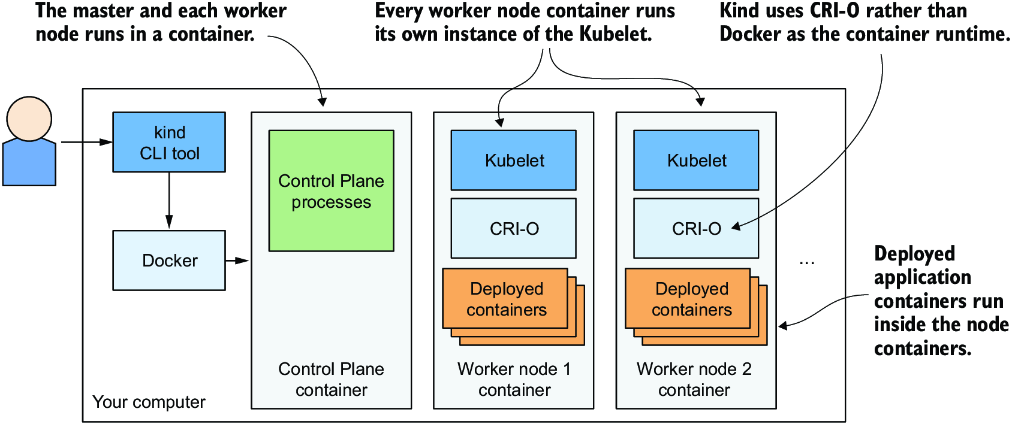
The architecture figure shows how Kind nests application containers inside Docker containers that act as Kubernetes nodes. section 3.1.3


