A search operation is an API operation that retrieves resources matching supplied criteria. It usually succeeds whether matching resources exist or not, returning found elements or an empty list rather than treating no results as an error. section 3.4.5 section 4.6.4
Design the operation around the consumer’s use case. A product search can return a focused ProductSummary model instead of every Product property, while exposing the product reference for later detail retrieval. section 5.3.2 section 10.1.4
Shape a useful search operation by deciding:
- Which filters consumers need, and where they appear; for example, use keywords and category query parameters in GET /products?keywords=anime,fantasy&category=BD. section 5.3.2
- How to sort and paginate large collections, reducing transferred data and avoiding impractical requests for every element. section 9.6
- Which HTTP responses represent results; 200 OK can represent both matching products and an empty result list. section 4.5.6
- Whether sensitive or overly complete filters require POST /resources/search instead of GET /resources; such operations should not also define query parameters. section 18.13
Searching a product catalog
GET /products?keywords=anime,fantasy&category=BD returns an array of ProductSummary objects. A matching response contains productReference, name, category, keywords, and price; no matches produce the same successful response shape with an empty array. Consumers can request full details through GET /products/{productReference}. section 5.3.2 section 4.6.4
Figure 9.9 Enabling filtering, sorting, and paginating lists is essential to allow consumers to get only the elements they want, sorted as needed.
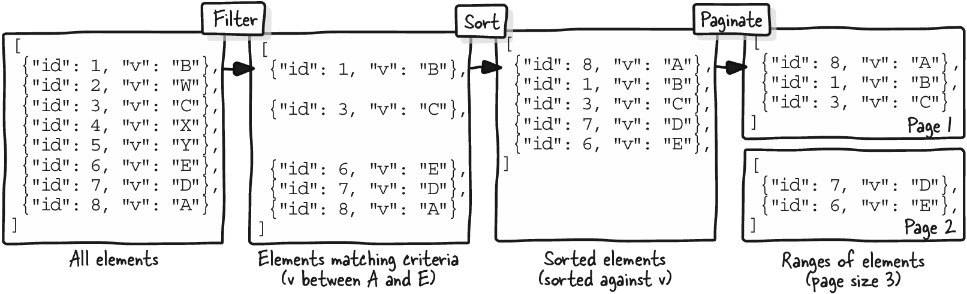
Use filtering, sorting, and pagination together to let consumers retrieve only the collection elements they need, in the order and page they choose. section 9.6





















