A Kubernetes resource is an entry you interact with through the Kubernetes API. Its object represents something in the cluster, such as an application deployment, a node, a load balancer, or an event. Users and Kubernetes components create and change these objects to configure the cluster. section 4.1 section 4.1.1
You can define objects in YAML or JSON manifests and submit them to the API. Objects contain type and metadata; most also have a spec describing the desired state and a status reporting the current state. Controllers watch for changes, act to bring the cluster toward the spec, and update status. section 1.2.4 section 4.4
Create and inspect a Deployment
Run `kubectl create deployment kiada --image=luksa/kiada:0.1` to create a Deployment object. Then run `kubectl get deployments` to see its reported readiness and availability. The Deployment states that the container image should run; Kubernetes creates the application instances and works toward that desired state. section 3.3.1
“Resource” and “object” are often used interchangeably, but they are not quite the same. A REST resource is an API address on which you can perform operations such as GET or DELETE. An object is the cluster item represented there; one object can be exposed through multiple resources. section 4.1.1 section 4.4
Figure 4.2 A single object can be exposed by two or more resources.
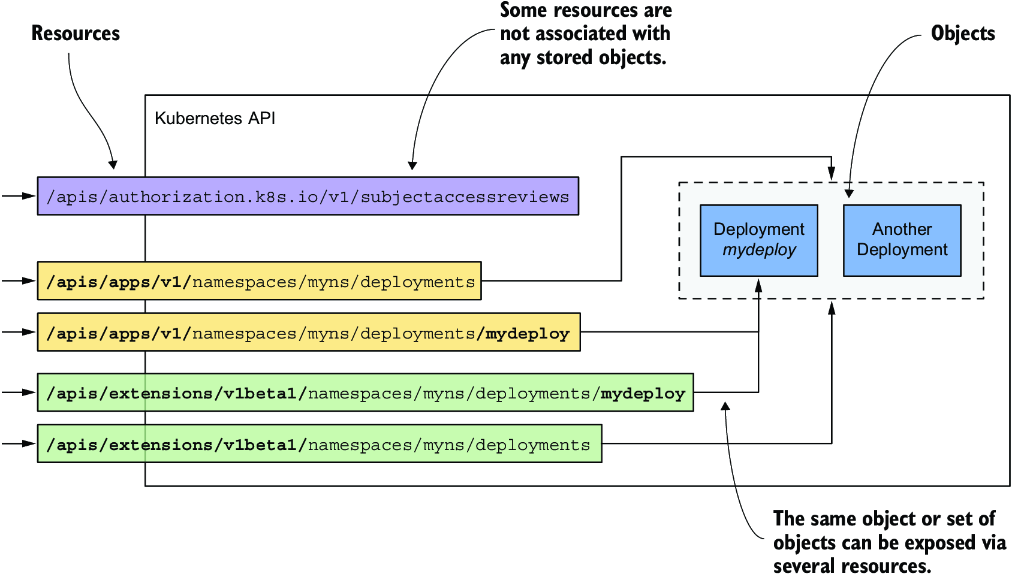
The diagram makes the resource–object distinction concrete: more than one API resource can expose the same object. section 4.1.1




