A lag is a temporal offset. For one series, a lag feature places an earlier value beside the current value. Between two series, a lag describes how far one tends to follow or precede the other. These uses answer related questions: how does a value compare with its own history, and how do measurements compare once their timing is aligned? section 17.2.5 section 17.2.9
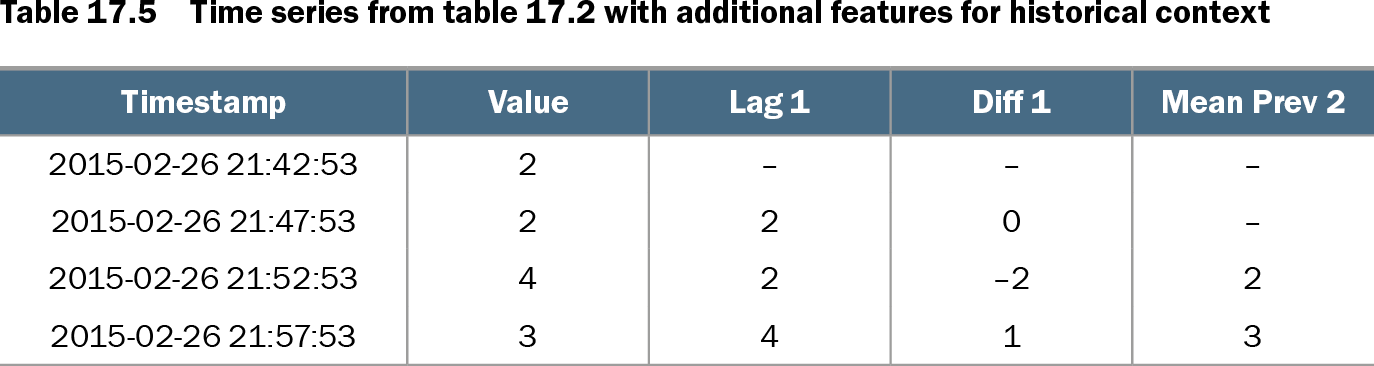
Table 17.5 Time series from table 17.2 with additional features for historical context (view table figure)
| Timestamp |
Value |
Lag 1 |
Diff 1 |
Mean Prev 2 |
|---|---|---|---|---|
| 2015-02-26 21:42:53 |
2 |
– |
– |
– |
| 2015-02-26 21:47:53 |
2 |
2 |
0 |
– |
| 2015-02-26 21:52:53 |
4 |
2 |
–2 |
2 |
| 2015-02-26 21:57:53 |
3 |
4 |
1 |
3 |
The table places each value alongside its preceding value, a difference, and a mean of previous values. The first row has no earlier value to supply its lag. section 17.2.5
Choosing an offset depends on the comparison needed. A one-step lag captures the immediately preceding observation; longer lags reach further back. Where a series has a daily cycle, a one-day lag compares values at the same time on successive days. Differences, prior-window statistics, and ratios can add context. Putting that history into each row allows standard tabular outlier detection to assess rows independently, provided the features capture enough relevant history. section 17.2.5
Lags also provide predictors for forecasting. A Python example creates columns with `df['Values'].shift(1)`, `.shift(7)`, and other offsets, drops rows without the required history, then fits a random-forest regressor. A large difference between a forecast and the actual value can indicate an outlier, but it should be judged against normal forecast errors. The example’s tree-based forecasts struggle with an upward trend when future values differ from those seen earlier. section 17.2.6
Listing 17.8 Forecasting values using a Random Forest
from sklearn.ensemble import RandomForestRegressor

df['Lag 1'] = df['Values'].shift(1)                         #1
df['Lag 7'] = df['Values'].shift(7)                         #2
df['Lag 14'] = df['Values'].shift(14)
df['Lag 28'] = df['Values'].shift(28)
df['Lag 30'] = df['Values'].shift(30)                       #3
df['Lag 360'] = df['Values'].shift(360)                     #4
df['Lag 364'] = df['Values'].shift(364)

x_train = df.drop(columns=['timestamp','Values'])[:1000]    #5
y_train = df['Values'][:1000]
x_train = x_train.dropna()
y_train = y_train.loc[x_train.index]
x_test = df.drop(columns=[ 'timestamp','Values'])[1000:]
y_test = df['Values'][1000:]

regr = RandomForestRegressor()                              #6
regr.fit(x_train, y_train)
y_pred = regr.predict(x_test)
The listing shows several offsets used as forecast inputs and removes incomplete training rows before fitting the regressor. section 17.2.6
Across related series, comparing values at identical timestamps can be misleading if their relationship is delayed. Purchases that replenish goods sold may follow sales by days; an economic leading indicator may precede another series. Shift a series into alignment or engineer features that account for the lag before using cross-series differences to look for unusual relationships. section 17.2.9