liveBook · Manning

LM Studio

As explained in AI Agents in Action

LM Studio is a desktop application for running large language models locally and exposing them through a server interface.

LM Studio is a free desktop application for downloading, loading, and running large language models locally on Windows, Mac, and Linux. It helps match models to available hardware and supports both chat use and local server hosting. section 2.2.1

A practical LM Studio workflow is:

  • Install LM Studio, search for a model, review its specifications and compatibility estimate, then download a suitable model. section 2.2.1
  • Load the model on the chat page, optionally enable a GPU, or open the server page and click Start Server. section 2.2.1 section 2.2.2
  • Connect Python through the OpenAI client using the local endpoint http://localhost:1234/v1, then send chat messages. section 2.2.2

Connecting a Python program

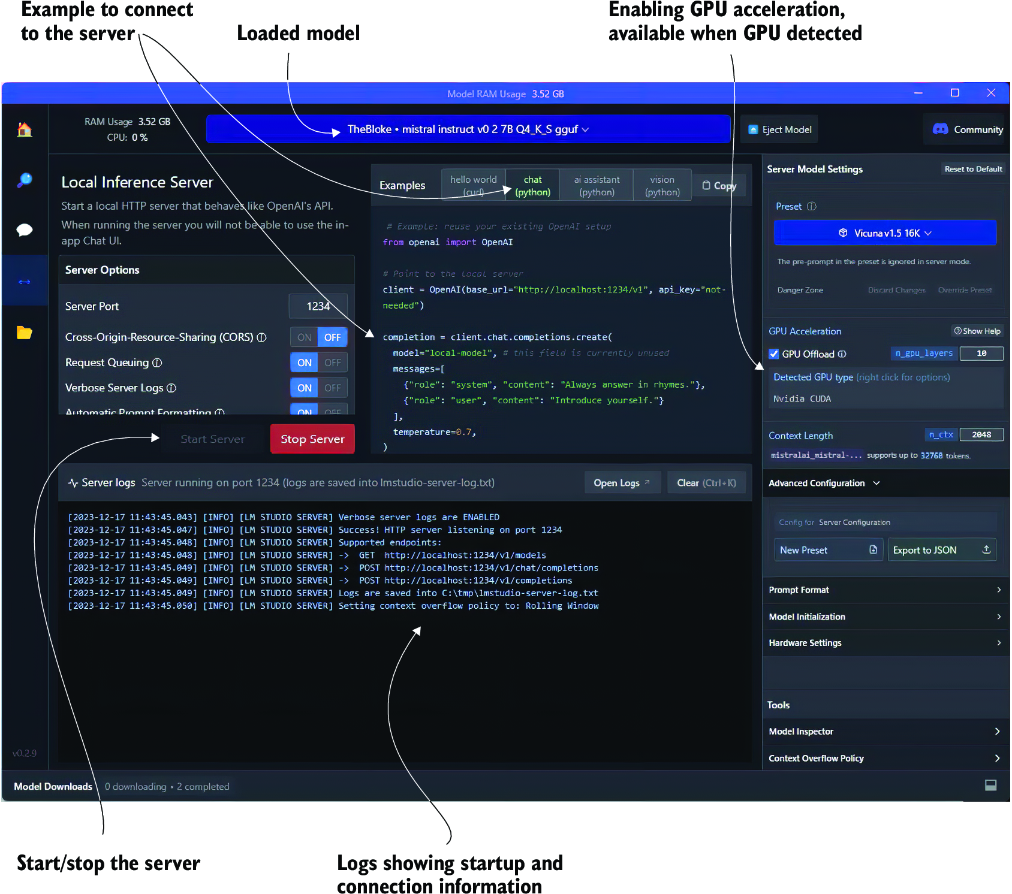
A Python client can target LM Studio with an OpenAI-compatible base URL and an unnecessary API key, select the local model, send system and user messages, and print the response. section 2.2.2

Figure 2.6 The LM Studio server page and a server running an LLM
figure

Shows the server page, loaded model, and running local server used for Python connections. section 2.2.2


How AI Agents in Action covers it

How deep it goes
Explains installation, model selection, compatibility checking, chat loading, server startup, and Python connection, but not model internals.
Examples
Uses model search, compatibility estimates, chat execution, a running server, and a Python chat-completion script.
What it assumes
Teaches installation and model serving from setup steps while requiring the ability to execute Python code.
What you can do after
Operate LM Studio locally, serve a downloaded model, and connect Python code to its responses.
How it connects
Connects local LLM hosting with Python integration, prompt engineering, agents, GPUs, and commercial models.

Also explained in

Compare how 3 books explain LM Studio →

Related concepts

This explainer was generated by Manning's knowledge graph from the text of AI Agents in Action. The section links point to the parts of the book it draws on.
