LM Studio is a desktop application for downloading, managing, chatting with, and serving language models locally. After models are downloaded, it supports entirely offline inference on macOS, Windows, and Linux. It is free but not open source, while providing open source utilities such as Python and JavaScript SDKs and the Apple MLX engine. section 12.3
LM Studio combines several operational paths:
- Chat view supports conversation, chat history, system prompts, temperature, sampling parameters, and document attachments. section 12.3
- Document attachments accept .docx, .pdf, and .txt files; shorter documents enter the conversation directly, while longer documents use chunking and retrieval-augmented generation. section 12.3
- Developer view and the local server support client applications through a REST API with OpenAI-like behavior. section 12.3
- The companion lms CLI loads and unloads models, starts or stops the local API server, and inspects raw model input and output. section 12.3
Typical local workflow
Download a GGUF or Apple MLX model from the LM Studio catalog or Hugging Face Hub, select it in the chat view, attach supporting documents when needed, and run conversations offline. Developers can instead start the local server and connect an application through the REST API or Python SDK. section 12.3 section 12.7
Figure 12.5 LM Studio’s chat view
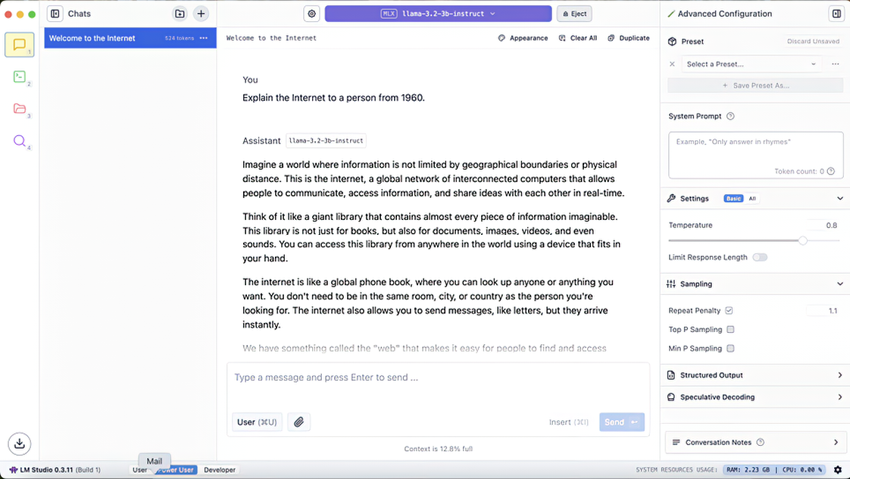
The chat-view figure helps locate model selection, conversation history, advanced generation settings, and document attachment controls. section 12.3


