A LoadBalancer service exposes selected Kubernetes pods to external clients through an external load balancer. It preserves stable access while pods are restarted, deleted, or rescheduled. section 3.3.4
Configure the service with:
- apiVersion: v1, kind: Service, and type: LoadBalancer. section 3.3.4
- A port exposed by the service and a targetPort where the application listens on selected pods. section 3.3.4
- A selector matching the application labels, such as app: fast-api. section 3.3.4
Expose an application externally
Apply a manifest with type: LoadBalancer, port: 80, targetPort: 8083, and selector app: fast-api using kubectl create -f loadbalancer-service.yaml. Check kubectl get service for the assigned EXTERNAL-IP, then send requests such as curl http://34.101.34.188:80. section 3.3.4
Figure 3.6 The user interacts with service 1 to access the frontend application. The frontend application talks to the backend application via service 2. Services here act as an abstraction.
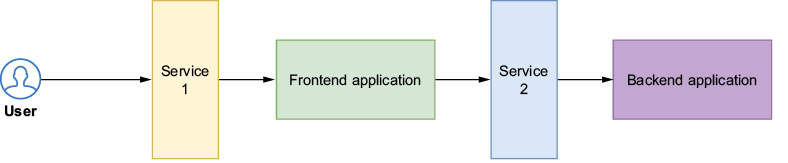
Use the service-abstraction diagram to trace external traffic through the load balancer to application pods. section 3.3.4




