LocalDB is a zero-configuration version of SQL Server used for local ASP.NET Core database development. It is installed through SQL Server Express and is Windows-only, so cross-platform ASP.NET Core projects cannot use these examples unchanged. section 1.2.2 section 2.1.3
Set up LocalDB with either Visual Studio or the standalone SQL Server Express installer:
- Select the ASP.NET and web development workload in Visual Studio, then enable SQL Server Express 2019 LocalDB under Individual components. section 2.1.1
- Alternatively, install SQL Server Express using the Custom option, create a new SQL Server installation, check LocalDB under Feature Selection, and retain the default instance configuration. section 2.1.3
- Add Entity Framework Core’s Design and SqlServer packages when an application stores and queries data through LocalDB. section 18.2.1
Installing LocalDB for an ASP.NET Core project
On Windows, install SQL Server Express, select LocalDB and the default instance, then add Microsoft.EntityFrameworkCore.Design and Microsoft.EntityFrameworkCore.SqlServer version 7.0.0 to the WebApp project. section 2.1.3 section 18.2.1
Figure 2.8 Selecting the LocalDB feature
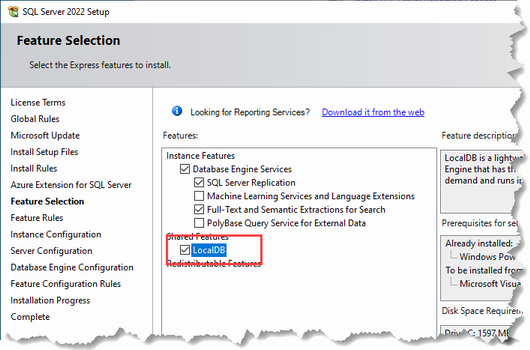
Use the installation figure to locate the LocalDB feature during SQL Server Express setup. section 2.1.3
