A MAC address table maps learned MAC addresses to the switch ports through which their devices are reachable. A switch uses the destination MAC address in an Ethernet frame to choose the outgoing port. section 6.0 section 6.3.1
Understand the table’s main behaviors:
- Learns dynamically from each frame’s Source field, associating the source MAC address with the receiving port. section 6.3.1
- Ages dynamic entries after five minutes without receiving a frame from the associated MAC address. section 6.3.1
- Forwards a known unicast frame through the port listed for its destination MAC address. section 6.3.2
- Floods an unknown unicast frame through every port except the receiving port, allowing the destination to respond and become learnable. section 6.3.2
Figure 6.3 A network with two switches, each with two PCs connected. SW1 and SW2 have learned the MAC address of each PC by examining the Source field of frames received on their ports as the PCs communicate with each other. SW1 knows it can reach PC1 via its G0/1 port, PC2 via its G0/2 port, and PC3/PC4 via its G0/0 port. SW2 knows it can reach PC1/PC2 via its G0/0 port, PC3 via its G0/1 port, and PC4 via its G0/2 port.
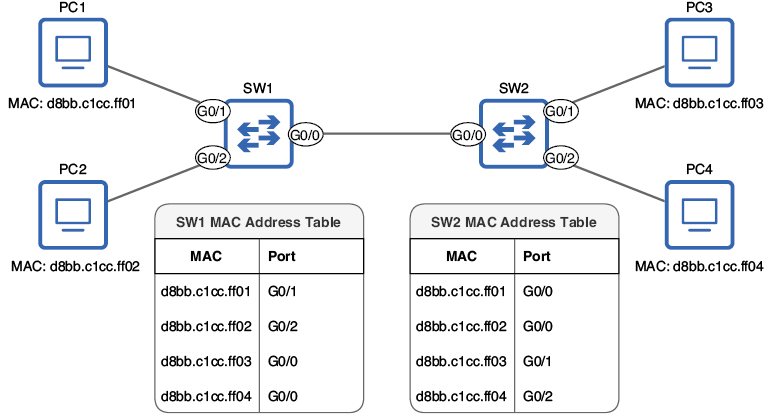
A two-switch topology shows how each switch records directly connected hosts and reaches remote hosts through the inter-switch port. section 6.3.1
Reading Cisco IOS output
Use show mac address-table in user or privileged EXEC mode. The output identifies each entry’s VLAN, MAC address, Type, and port. DYNAMIC entries were learned automatically; STATIC entries were manually configured. To remove dynamically learned entries, use clear mac address-table dynamic. Specific addresses or interfaces can also be targeted. section 6.3.3 section 6.3.3
Do not confuse a MAC address table with an ARP table. The switch’s table maps MAC addresses to switch ports for frame forwarding; an ARP table maps IP addresses to MAC addresses for frame encapsulation by hosts or routers. section 10.1.1

