A network switch connects devices within a local area network (LAN). End hosts communicate through the switch, which provides infrastructure rather than acting as their communication endpoint. Typical switches provide 24–48 ports for PCs, cameras, printers, and servers. section 2.2.2 section 2.3
Figure 2.4 Three end hosts connected to a switch
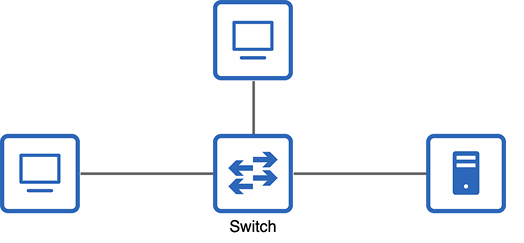
Three end hosts connected to a switch illustrate the basic LAN arrangement. section 2.2.2
A Layer 2 switch forwards Ethernet frames using Layer 2 information, especially destination and source MAC addresses. It learns which MAC address belongs to each port, forwards known unicast frames, and floods broadcast or unknown unicast frames. It does not modify forwarded frames. section 6.0 section 10.3 section 6.2.2
Keep these operational distinctions in mind:
- A switch forwards traffic within a LAN; a router connects LANs and external networks. section 2.2.2
- Switch interfaces do not need IP addresses for basic frame forwarding, because forwarding uses MAC addresses. section 8.1
- Switch interfaces are enabled by default, while unused interfaces should be disabled as a security best practice. section 8.1
- A MAC address table maps MAC addresses to switch ports; an ARP table maps IP addresses to MAC addresses. section 10.1.1
ARP through a switch
When PC1 broadcasts an ARP request for its default gateway, the switch learns PC1’s MAC address and floods the request. After the router replies, the switch learns the router’s MAC address and forwards the known unicast reply to PC1. section 10.1.1
Basic switching is plug-and-play, but managed switches support advanced configuration. Cisco IOS interface configuration can set descriptions, speed, duplex, and port shutdown. VLANs divide one LAN into smaller Layer 2 networks; multilayer switches additionally route between VLANs through SVIs. section 8.1 section 12.0 section 12.4.2
